TL;DR: Firefox’s built-in PDF viewer is on track to gain some drastic improvements in memory consumption and speed when Firefox 29 is released in late April.
Firefox 19 introduced a built-in PDF viewer which allows PDF files to be viewed directly within Firefox. This is made possible by the pdf.js project, which implements a PDF viewer entirely in HTML and JavaScript.
This is a wonderful feature that makes the reading of PDFs on websites much less disruptive. However, pdf.js unfortunately suffers at times from high memory consumption. Enough, in fact, that it is currently the #5 item on the MemShrink project’s “big ticket items” list.
Recently, I made four improvements to pdf.js, each of which reduces its memory consumption greatly on certain kinds of PDF documents.
Image masks
The first improvement involved documents that use image masks, which are bitmaps that augment an image and dictate which pixels of the image should be drawn. Previously, the 1-bit-per-pixel (a.k.a 1bpp) image mask data was being expanded into 32bpp RGBA form (a typed array) in a web worker, such that every RGB element was 0 and the A element was either 0 or 255. This typed array was then passed to the main thread, which copied the data into an ImageData object and then put that data to a canvas.
The change was simple: instead of expanding the bitmap in the worker, just transfer it as-is to the main thread, and expand its contents directly into the ImageData object. This removes the RGBA typed array entirely.
I tested two documents on my Linux desktop, using a 64-bit trunk build of Firefox. Initially, when loading and then scrolling through the documents, physical memory consumption peaked at about 650 MiB for one document and about 800 MiB for the other. (The measurements varied somewhat from run to run, but were typically within 10 or 20 MiB of those numbers.) After making the improvement, the peak for both documents was about 400 MiB.
Image copies
The second improvement involved documents that use images. This includes scanned documents, which consist purely of one image per page.
Previously, we would make five copies of the 32bpp RGBA data for every image.
- The web worker would decode the image’s colour data (which can be in several different colour forms: RGB, grayscale, CMYK, etc.) from the PDF file into a 24bpp RGB typed array, and the opacity (a.k.a. alpha) data into an 8bpp A array.
- The web worker then combined the the RGB and A arrays into a new 32bpp RGBA typed array. The web worker then transferred this copy to the main thread. (This was a true transfer, not a copy, which is possible because it’s a typed array.)
- The main thread then created an
ImageDataobject of the same dimensions as the typed array, and copied the typed array’s contents into it. - The main thread then called
putImageData()on theImageDataobject. The C++ code within Gecko that implementsputImageData() then created a newgfxImageSurfaceobject and copied the data into it. - Finally, the C++ code also created a Cairo surface from the
gfxImageSurface.
Copies 4 and 5 were in C++ code and are both very short-lived. Copies 1, 2 and 3 were in JavaScript code and so lived for longer; at least until the next garbage collection occurred.
The change was in two parts. The first part involved putting the image data to the canvas in tiny strips, rather than doing the whole image at once. This was a fairly simple change, and it allowed copies 3, 4 and 5 to be reduced to a tiny fraction of their former size (typically 100x or more smaller). Fortunately, this caused no slow-down.
The second part involved decoding the colour and opacity data directly into a 32bpp RGBA array in simple cases (e.g. when no resizing is involved), skipping the creation of the intermediate RGB and A arrays. This was fiddly, but not too difficult.
If you scan a US letter document at 300 dpi, you get about 8.4 million pixels, which is about 1 MiB of data. (A4 paper is slightly larger.) If you expand this 1bpp data to 32bpp, you get about 32 MiB per page. So if you reduce five copies of this data to one, you avoid about 128 MiB of allocations per page.
Black and white scanned documents
The third improvement also involved images. Avoiding unnecessary RGBA copies seemed like a big win, but when I scrolled through large scanned documents the memory consumption still grew quickly as I scrolled through more pages. I eventually realized that although four of those five copies had been short-lived, one of them was very long-lived. More specifically, once you scroll past a page, its RGBA data is held onto until all pages that are subsequently scrolled past have been decoded. (The memory is eventually freed; it just takes longer than we’d like.) And fixing it is not easy, because it involves page-prioritization code isn’t easy to change without hurting other aspects of pdf.js’s performance.
However, I was able to optimize the common case of simple (e.g. unmasked, with no resizing) black and white images. Instead of expanding the 1bpp image data to 32bpp RGBA form in the web worker and passing that to the main thread, the code now just passes the 1bpp form directly. (Yep, that’s the same optimization that I used for the image masks.) The main thread can now handle both forms, and for the 1bpp form the expansion to the 32bpp form also only happens in tiny strips.
I used a 226 page scanned document to test this. At about 34 MiB per page, that’s over 7,200 MiB of pixel data when expanded to 32bpp RGBA form. And sure enough, prior to my change, scrolling quickly through the whole document caused Firefox’s physical memory consumption to reach about 7,800 MiB. With the fix applied, this number reduced to about 700 MiB. Furthermore, the time taken to render the final page dropped from about 200 seconds to about 25 seconds. Big wins!
The same optimization could be done for some non-black and white images (though the improvement will be smaller). But all the examples from bug reports were black and white, so that’s all I’ve done for now.
Parsing
The fourth and final improvement was unrelated to images. It involved the parsing of the PDF files. The parsing code reads files one byte at a time, and constructs lots of JavaScript strings by appending one character at a time. SpiderMonkey’s string implementation has an optimization that handles this kind of string construction efficiently, but the optimization doesn’t kick in until the strings have reached a certain length; on 64-bit platforms, this length is 24 characters. Unfortunately, many of the strings constructed during PDF parsing are shorter than this, so in order a string of length 20, for example, we would also create strings of length 1, 2, 3, …, 19.
It’s possible to change the threshold at which the optimization applies, but this would hurt the performance of some other workloads. The easier thing to do was to modify pdf.js itself. My change was to build up strings by appending single-char strings to an array, and then using Array.join to concatenate them together once the token’s end is reached. This works because JavaScript arrays are mutable (unlike strings which are immutable) and Array.join is efficient because it knows exactly how long the final string will be.
On a 4,155 page PDF, this change reduced the peak memory consumption during file loading from about 1130 MiB to about 800 MiB.
Profiling
The fact that I was able to make a number of large improvements in a short time indicates that pdf.js’s memory consumption has not previously been closely looked at. I think the main reason for this is that Firefox currently doesn’t have much in the way of tools for profiling the memory consumption of JavaScript code (though the devtools team is working right now to rectify this). So I will explain the tricks I used to find the places that needed optimization.
Choosing test cases
First I had to choose some test cases. Fortunately, this was easy, because we had numerous bug reports about high memory consumption which included test files. So I just used them.
Debugging print statements, part 1
For each test case, I looked first at about:memory. There were some very large “objects/malloc-heap/elements/non-asm.js” entries, which indicate that lots of memory is being used by JavaScript array elements. And looking at pdf.js code, typed arrays are used heavily, especially Uint8Array. The question is then: which typed arrays are taking up space?
To answer this question, I introduced the following new function.
function newUint8Array(length, context) {
  dump("newUint8Array(" + context + "): " + length + "\n");
  return new Uint8Array(length);
}
I then replaced every instance like this:
var a = new Uint8Array(n);
with something like this:
var a = newUint8Array(n, 1);
I used a different second argument for each instance. With this in place, when the code ran, I got a line printed for every allocation, identifying its length and location. With a small amount of post-processing, it was easy to identify which parts of the code were allocating large typed arrays. (This technique provides cumulative allocation measurements, not live data measurements, because it doesn’t know when these arrays are freed. Nonetheless, it was good enough.) I used this data in the first three optimizations.
Debugging print statements, part 2
Another trick involved modifying jemalloc, the heap allocator that Firefox uses. I instrumented jemalloc’s huge_malloc() function, which is responsible for allocations greater than 1 MiB. I printed the sizes of allocations, and at one point I also used gdb to break on every call to huge_malloc(). It was by doing this that I was able to work out that we were making five copies of the RGBA pixel data for each image. In particular, I wouldn’t have known about the C++ copies of that data if I hadn’t done this.
Notable strings
Finally, while looking again at about:memory, I saw some entries like the following, which are found by the “notable strings” detection.
> │    │  │  │  │  │  ├────0.38 MB (00.03%) ── string(length=10, copies=6174, "http://sta")/gc-heap
> │    │  │  │  │  │  ├────0.38 MB (00.03%) ── string(length=11, copies=6174, "http://stac")/gc-heap
> │    │  │  │  │  │  ├────0.38 MB (00.03%) ── string(length=12, copies=6174, "http://stack")/gc-heap
> │    │  │  │  │  │  ├────0.38 MB (00.03%) ── string(length=13, copies=6174, "http://stacks")/gc-heap
> │    │  │  │  │  │  ├────0.38 MB (00.03%) ── string(length=14, copies=6174, "http://stacks.")/gc-heap
> │    │  │  │  │  │  ├────0.38 MB (00.03%) ── string(length=15, copies=6174, "http://stacks.m")/gc-heap
> │    │  │  │  │  │  ├────0.38 MB (00.03%) ── string(length=16, copies=6174, "http://stacks.ma")/gc-heap
> │    │  │  │  │  │  ├────0.38 MB (00.03%) ── string(length=17, copies=6174, "http://stacks.mat")/gc-heap
> │    │  │  │  │  │  ├────0.38 MB (00.03%) ── string(length=18, copies=6174, "http://stacks.math")/gc-heap
It doesn’t take much imagination to realize that strings were being built up one character at a time. This looked like the kind of thing that would happen during tokenization, and I found a file called parser.js and looked there. And I knew about SpiderMonkey’s optimization of string concatenation and asked on IRC about why it might not be happening, and Shu-yu Guo was able to tell me about the threshold. Once I knew that, switching to use Array.join wasn’t difficult.
What about Chrome’s heap profiler?
I’ve heard good things in the past about Chrome/Chromium’s heap profiling tools. And because pdf.js is just HTML and JavaScript, you can run it in other modern browsers. So I tried using Chromium’s tools, but the results were very disappointing.
Remember the 226 page scanned document I mentioned earlier, where over 7,200 MiB of pixel data was created? I loaded that document into Chromium and used the “Take Heap Snapshot” tool, which gave the following snapshot.
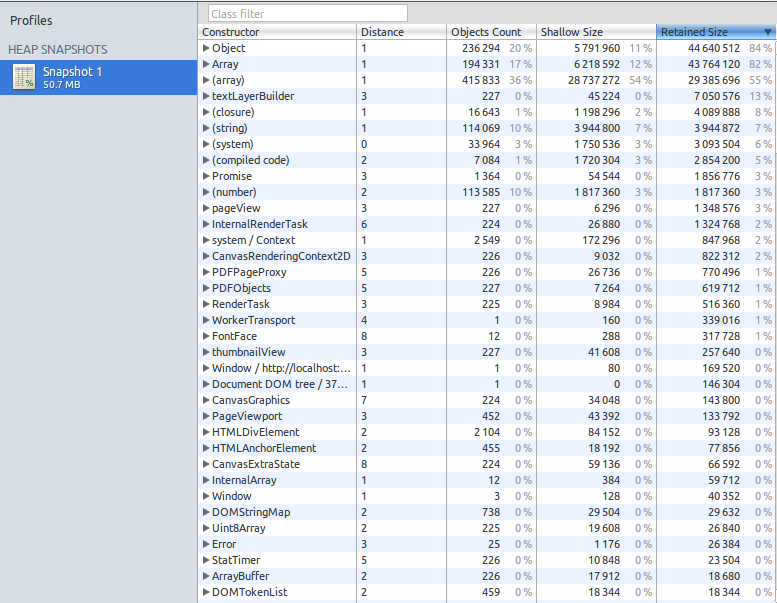
At the top left, it claims that the heap was just over 50 MiB in size. Near the bottom, it claims that 225 Uint8Array objects had a “shallow” size of 19,608 bytes, and a “retained” size of 26,840 bytes. This seemed bizarre, so I double-checked. Sure enough, the operating system (via top) reported that the relevant chromium-browser process was using over 8 GiB of physical memory at this point.
So why the tiny measurements? I suspect what’s happening is that typed arrays are represented by a small header struct which is allocated on the GC heap, and it points to the (much larger) element data which is allocated on the malloc heap. So if the snapshot is just measuring the GC heap, in this case it’s accurate but not useful. (I’d love to hear if anyone can confirm or refute this hypothesis.) I also tried the “Record Heap Allocations” tool but it gave much the same results.
Status
These optimizations have landed in the master pdf.js repository, and were imported into Firefox 29, which is currently on the Aurora branch, and is on track to be released on April 29.
The optimizations are also on track to be imported into the Firefox OS 1.3 and 1.3T branches. I had hoped to show that some PDFs that were previously unloadable on Firefox OS would now be loadable. Unfortunately, I am unable to load even the simplest PDFs on my Buri (a.k.a. Alcatel OneTouch), because the PDF viewer app appears to consistently run out of gralloc memory just before the first page is displayed. Ben Kelly suggested that Async pan zoom (APZ) might be responsible, but disabling it didn’t help. If anybody knows more about this please contact me.
Finally, I’ve fixed most of the major memory consumption problems with the PDFs that I’m aware of. If you know of other PDFs that still cause pdf.js to consume large amounts of memory, please let me know. Thanks.


