I’m worried about Firefox 4.0’s memory consumption. Bug 598466 indicates that it’s significantly higher than Firefox 3.6’s memory consumption. So I did some profiling with Massif, a memory profiler built with Valgrind.
My test run involved a Firefox profile in which 20 tabs were open to random comics from http://www.cad-comic.com/cad/. This is a site that uses lots of JavaScript code. I ran a 64-bit version of Firefox on a Ubuntu 10.10 machine.
Here’s the command line I used:
  valgrind --smc-check=all --trace-children=yes --tool=massif --pages-as-heap=yes \
    --detailed-freq=1000000 optg64/dist/bin/firefox -P cad20 -no-remote
Here’s what that means:
--smc-check=all tells Valgrind that the program may use self-modifying code (or, in Firefox’s case, overwrite dynamically generated code).--trace-children tells Valgrind to trace into child processes exec’d by the program. This is necessary because optg64/dist/bin/firefox is a wrapper script.--tool=massif tells Valgrind to run Massif.--pages-as-heap=yes tells Massif to profile allocations of all memory at the page level, rather than just profiling the heap (ie. memory allocated via malloc/new). This is important because the heap is less than half of Firefox’s memory consumption.--detailed-freq=1000000 tells Massif to do detailed snapshots (which are more informative but more costly) only every 1,000,000th snapshot, which is less often than the default of every 10th snapshot. This makes it run a bit faster. This is fine because Massif always takes a detailed snapshot at the peak memory consumption point, and that’s the one I’m interested in.optg64/ is the name of my build directory.-P cad20 tells Firefox to use a particular profile that I set up appropriately.-no-remote tells Firefox to start a new instance; this is necessary because I had a Firefox 3.6 process already running.
Massif produced a number of files, one per invoked process. They have names like massif.out.22722, where the number is the process ID. I worked out which one was the main Firefox executable; this is not hard because the output file has the invoked command on its second line. I then viewed it in two ways. The first was with Massif’s ms_print script, using this command:
ms_print massif.out.22722
This produces a text representation of the information that Massif collects.
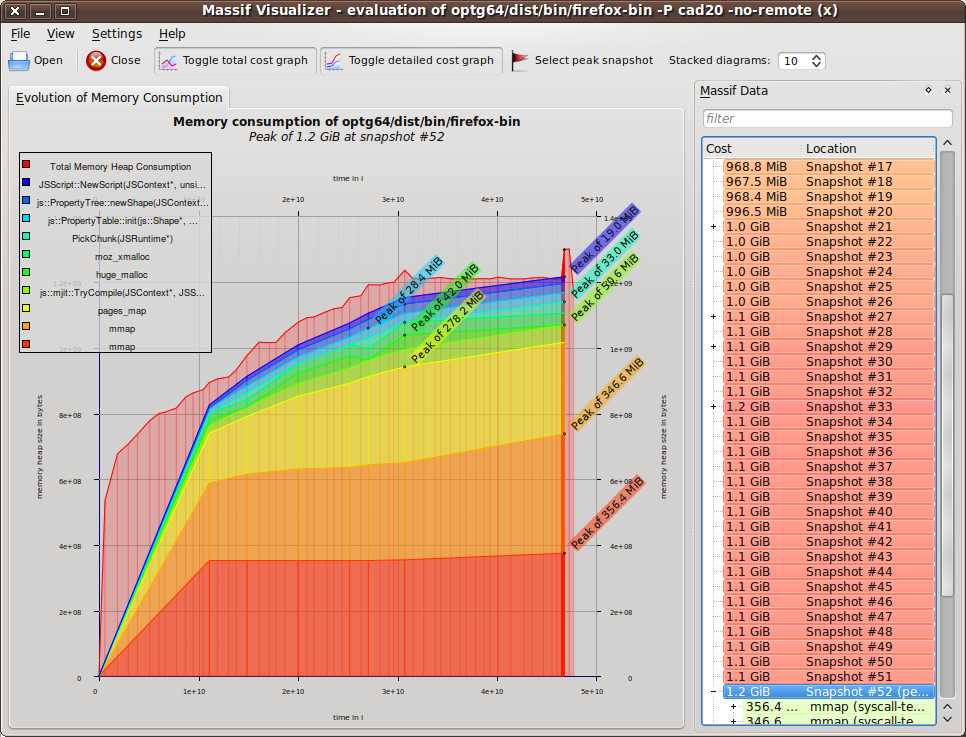
The second was with the massif-visualizer program, which is not part of the Valgrind distribution, but is available here. The information it shows is much the same as that shown by ms_print, but it’s much prettier. Below is a screenshot that shows the basic progression of the memory consumption (click on it for a full-size version).
At the peak memory usage point, a total of 1,297,612,808 bytes were mapped.
I went through the detailed snapshot taken at the point of peak memory consumption. Massif takes the stack trace of every memory allocation in the program, and collapses them into a tree structure in which common stack trace prefixes are merged. See the Massif user manual for more details of this tree structure; what’s relevant for this blog post is that I (manually) picked out various places in the code that cause significant amounts of memory to be mapped. These places together cover 68.85% (893,463,472 bytes) of the total mapped memory; the other 31.15% was taken up by smaller allocations that are less worth singling out. Each place contains a partial stack trace as identification. I’ve listed them from largest to smallest.
28.40% (368,484,352 bytes) here:
  mmap (syscall-template.S:82)
  _dl_map_object_from_fd (dl-load.c:1195)
  _dl_map_object (dl-load.c:2234)
This is for the loading of shared objects, both data and code.
12.94% (167,854,080 bytes) here:
  mmap (syscall-template.S:82)
  pthread_create@@GLIBC_2.2.5 (allocatestack.c:483)
  _PR_CreateThread (ptthread.c:424)
This is for thread stacks. Robert O’Callahan and Chris Jones tell me that Linux thread stacks are quite large (8MB?) but although that space is mapped, most of it won’t be committed (i.e. actually used).
6.54% (84,828,160 bytes) here:
  mmap (syscall-template.S:82)
  JSC::ExecutablePool::systemAlloc(unsigned long) (ExecutableAllocatorPosix.cpp:43)
  JSC::ExecutablePool::create(unsigned long) (ExecutableAllocator.h:374)
  js::mjit::Compiler::finishThisUp(js::mjit::JITScript**) (ExecutableAllocator.h:)
This is for native code generated by JaegerMonkey. Bug 615199 has more about this.
5.17% (67,112,960 bytes) here:
  mmap (syscall-template.S:82)
  pa_shm_create_rw (in /usr/lib/libpulsecommon-0.9.21.so)
  pa_mempool_new (in /usr/lib/libpulsecommon-0.9.21.so)
  pa_context_new_with_proplist (in /usr/lib/libpulse.so.0.12.2)
  ??? (in /usr/lib/libcanberra-0.22/libcanberra-pulse.so)
  pulse_driver_open (in /usr/lib/libcanberra-0.22/libcanberra-pulse.so)
  ??? (in /usr/lib/libcanberra.so.0.2.1)
  ??? (in /usr/lib/libcanberra.so.0.2.1)
  ca_context_play_full (in /usr/lib/libcanberra.so.0.2.1)
  ca_context_play (in /usr/lib/libcanberra.so.0.2.1)
  nsSound::PlayEventSound(unsigned int) (nsSound.cpp:467)
  nsMenuPopupFrame::ShowPopup(int, int) (nsMenuPopupFrame.cpp:749)
  nsXULPopupManager::ShowPopupCallback(nsIContent*, nsMenuPopupFrame*, int, int) (nsXULPopupManager.cpp:709)
  nsXULPopupManager::FirePopupShowingEvent(nsIContent*, int, int) (nsXULPopupManager.cpp:1196)
  nsXULPopupShowingEvent::Run() (nsXULPopupManager.cpp:2196)
  nsThread::ProcessNextEvent(int, int*) (nsThread.cpp:626)
  NS_ProcessNextEvent_P(nsIThread*, int) (nsThreadUtils.cpp:250)
  mozilla::ipc::MessagePump::Run(base::MessagePump::Delegate*) (MessagePump.cpp:110)
  MessageLoop::Run() (message_loop.cc:202)
  nsBaseAppShell::Run() (nsBaseAppShell.cpp:192)
  nsAppStartup::Run() (nsAppStartup.cpp:191)
  XRE_main (nsAppRunner.cpp:3691)
  main (nsBrowserApp.cpp:158)
This is sound-related stuff, which is a bit surprising, because the CAD website doesn’t produce any sound, as far as I can tell.
3.58% (46,505,328 bytes) here:
  js::mjit::Compiler::finishThisUp(js::mjit::JITScript**) (jsutil.h:213)
  js::mjit::Compiler::performCompilation(js::mjit::JITScript**) (Compiler.cpp:208)
  js::mjit::Compiler::compile() (Compiler.cpp:134)
  js::mjit::TryCompile(JSContext*, JSStackFrame*) (Compiler.cpp:245)
  js::mjit::stubs::UncachedCallHelper(js::VMFrame&, unsigned int, js::mjit::stubs::UncachedCallResult*) (InvokeHelpers.cpp:387)
  js::mjit::ic::Call(js::VMFrame&, js::mjit::ic::CallICInfo*) (MonoIC.cpp:831)
This is auxiliary info generated by JaegerMonkey. Bug 615199 again has more on this, and some good progress has been made towards reducing this.
2.42% (31,457,280 bytes) here:
  huge_malloc (jemalloc.c:4654)
  posix_memalign (jemalloc.c:4022)
  XPConnectGCChunkAllocator::doAlloc() (xpcjsruntime.cpp:1169)
  PickChunk(JSRuntime*) (jsgcchunk.h:68)
  RefillFinalizableFreeList(JSContext*, unsigned int) (jsgc.cpp:468)
  js_NewFunction(JSContext*, JSObject*, int (*)(JSContext*, unsigned int, js::Value*), unsigned int, unsigned int, JSObject*, JSAtom*) (jsgcinlines.h:127)
2.04% (26,472,576 bytes) here:
  js::PropertyTable::init(js::Shape*, JSContext*) (jsutil.h:213)
  JSObject::addPropertyInternal(JSContext*, long, int (*)(JSContext*, JSObject*, long, js::Value*), int (*)(JSContext*, JSObject*, long, js::Value*), unsigned int, unsigned int, unsigned int, int, js::Shape**) (jsscope.cpp:859)
  JSObject::putProperty(JSContext*, long, int (*)(JSContext*, JSObject*, long, js::Value*), int (*)(JSContext*, JSObject*, long, js::Value*), unsigned int, unsigned int, unsigned int, int) (jsscope.cpp:905)
Bug 610070 is open about this.
1.58% (20,484,096 bytes) here:
  moz_xmalloc (mozalloc.cpp:98)
  GCGraphBuilder::NoteScriptChild(unsigned int, void*) (mozalloc.h:229)
1.44% (18,698,240 bytes) here:
  JS_ArenaAllocate (jsutil.h:209)
  NewOrRecycledNode(JSTreeContext*) (jsparse.cpp:487)
  JSParseNode::create(JSParseNodeArity, JSTreeContext*) (jsparse.cpp:557)
1.38% (17,898,944 bytes) here:
  JSScript::NewScript(JSContext*, unsigned int, unsigned int, unsigned int, unsigned int, unsigned int, unsigned int, unsigned int, unsigned int, unsigned int, unsigned short, unsigned short) (jsutil.h:209)
  JSScript::NewScriptFromCG(JSContext*, JSCodeGenerator*) (jsscript.cpp:1171)
  js_EmitFunctionScript (jsemit.cpp:3767)
  js_EmitTree (jsemit.cpp:4629)
1.20% (15,560,704 bytes) here:
  sqlite3MemMalloc (sqlite3.c:13855)
  mallocWithAlarm (sqlite3.c:17333)
1.10% (14,315,520 bytes) here:
  JS_ArenaAllocate (jsutil.h:209)
  js::PropertyTree::newShape(JSContext*, bool) (jspropertytree.cpp:97)
  js::PropertyTree::getChild(JSContext*, js::Shape*, js::Shape const&) (jspropertytree.cpp:428)
  JSObject::getChildProperty(JSContext*, js::Shape*, js::Shape&) (jsscope.cpp:580)
  JSObject::addPropertyInternal(JSContext*, long, int (*)(JSContext*, JSObject*, long, js::Value*), int (*)(JSContext*, JSObject*, long, js::Value*), unsigned int, unsigned int, unsigned int, int, js::Shape**) (jsscope.cpp:829)
  JSObject::putProperty(JSContext*, long, int (*)(JSContext*, JSObject*, long, js::Value*), int (*)(JSContext*, JSObject*, long, js::Value*), unsigned int, unsigned int, unsigned int, int) (jsscope.cpp:905)
1.06% (13,791,232 bytes) here:
  mmap (syscall-template.S:82)
  g_mapped_file_new (in /lib/libglib-2.0.so.0.2400.1)
  ??? (in /usr/lib/libgtk-x11-2.0.so.0.2000.1)
  ??? (in /usr/lib/libgtk-x11-2.0.so.0.2000.1)
  ??? (in /usr/lib/libgtk-x11-2.0.so.0.2000.1)
  ??? (in /usr/lib/libgtk-x11-2.0.so.0.2000.1)
  ??? (in /usr/lib/libgtk-x11-2.0.so.0.2000.1)
  gtk_icon_theme_lookup_icon (in /usr/lib/libgtk-x11-2.0.so.0.2000.1)
  gtk_icon_theme_load_icon (in /usr/lib/libgtk-x11-2.0.so.0.2000.1)
  gtk_icon_set_render_icon (in /usr/lib/libgtk-x11-2.0.so.0.2000.1)
  gtk_widget_render_icon (in /usr/lib/libgtk-x11-2.0.so.0.2000.1)
  nsIconChannel::Init(nsIURI*) (nsIconChannel.cpp:497)
  nsIconProtocolHandler::NewChannel(nsIURI*, nsIChannel**) (nsIconProtocolHandler.cpp:115)
  nsIOService::NewChannelFromURI(nsIURI*, nsIChannel**) (nsIOService.cpp:609)
  NewImageChannel(nsIChannel**, nsIURI*, nsIURI*, nsIURI*, nsILoadGroup*, nsCString const&, unsigned int, nsIChannelPolicy*) (nsNetUtil.h:228)
  imgLoader::LoadImage(nsIURI*, nsIURI*, nsIURI*, nsILoadGroup*, imgIDecoderObserver*, nsISupports*, unsigned int, nsISupports*, imgIRequest*, nsIChannelPolicy*, imgIRequest**)(imgLoader.cpp:1621)
  nsContentUtils::LoadImage(nsIURI*, nsIDocument*, nsIPrincipal*, nsIURI*, imgIDecoderObserver*, int, imgIRequest**) (nsContentUtils.cpp:2550)
  nsCSSValue::Image::Image(nsIURI*, nsStringBuffer*, nsIURI*, nsIPrincipal*, nsIDocument*) (nsCSSValue.cpp:1290)
  nsCSSValue::StartImageLoad(nsIDocument*) const (nsCSSValue.cpp:549)
  nsCSSCompressedDataBlock::MapRuleInfoInto(nsRuleData*) const (nsCSSDataBlock.cpp:190)
  nsRuleNode::WalkRuleTree(nsStyleStructID, nsStyleContext*, nsRuleData*, nsCSSStruct*) (nsRuleNode.cpp:2050)
  nsRuleNode::GetListData(nsStyleContext*) (nsRuleNode.cpp:1869)
  nsRuleNode::GetStyleData(nsStyleStructID, nsStyleContext*, int) (nsStyleStructList.h:81)
  nsRuleNode::WalkRuleTree(nsStyleStructID, nsStyleContext*, nsRuleData*, nsCSSStruct*) (nsRuleNode.cpp:2141)
  nsRuleNode::GetListData(nsStyleContext*) (nsRuleNode.cpp:1869)
  nsRuleNode::GetStyleList(nsStyleContext*, int) (nsStyleStructList.h:81)
  nsImageBoxFrame::DidSetStyleContext(nsStyleContext*) (nsStyleStructList.h:81)
  nsFrame::Init(nsIContent*, nsIFrame*, nsIFrame*) (nsFrame.cpp:369)
  nsLeafBoxFrame::Init(nsIContent*, nsIFrame*, nsIFrame*) (nsLeafBoxFrame.cpp:98)
  nsImageBoxFrame::Init(nsIContent*, nsIFrame*, nsIFrame*) (nsImageBoxFrame.cpp:233)
I’m hoping that someone (or multiple people) who reads this will be able to identify places where memory consumption can be reduced. I’m happy to provide the raw data file to anyone who asks for it, though I also encourage people to try Massif themselves on different workloads.
Update. I forgot to mention that there was also the plugin-container process that ran in parallel to the main Firefox process. It was invoked by Firefox like so:
  /home/njn/moz/ws0/optg64/dist/bin/plugin-container \
    /home/njn/.mozilla/plugins/libflashplayer.so 22658 false plugin
It allocated 458,676,874 bytes at peak. 62.7% was due to the loading of shared objects, 12.8% was due to thread stacks, and the remaining 24.5% was due to unknown allocation sites (probably because the flash binary was missing symbols) and allocations too small to be worth singling out.