Ah, inline-block, that elusive and oh so tempting display declaration that promises so much, yet delivers so little. Too many times have I received PSD files like this:

and begin to cry.
Normally, this type of layout would be a cakewalk. Fixed width, fixed height, float:left and you’re done. Buuuuut, the design needs to work with variable amounts of content, which means if one of these blocks has more content than the others, it will break the layout:

Because the first gallery item is taller than the rest, the 5th item is floated left against it instead of below it. Basically we want a layout with the flexibility of a table, but proper, semantic markup.
We start with a simple page with an unordered list and display set to inline-block:
<ul>
<li>
<h4>This is awesome</h4>
<img src="http://farm4.static.flickr.com/3623/3279671785_d1f2e665b6_s.jpg"
alt="lobster" width="75" height="75"/>
</li>
...
<ul>
<style>
li {
width: 200px;
min-height: 250px;
border: 1px solid #000;
display: inline-block;
margin: 5px;
}
</style>
And it looks ok in Firefox 3, Safari 3 and Opera:
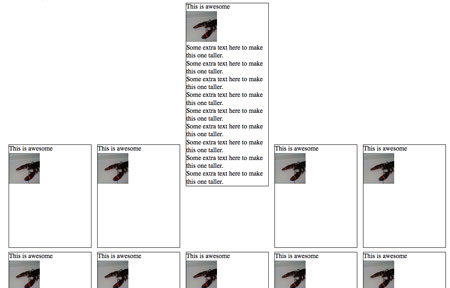
Obviously, something is wrong with the vertical alignment. Well, not exactly wrong, because this is the correct behavior, but it’s not what we want.
What’s going on here is the baseline of each <li> is being aligned with the baseline of the parent <ul>. What’s a baseline, you ask? A picture is worth a thousand words:

The baseline is the black line running through the text above. Putting it as simply as possible, the default vertical-align value on inline or inline-block element is baseline, which means the element’s baseline will be aligned with its parent’s baseline. Here’s the first inline-block attempt with baselines shown:
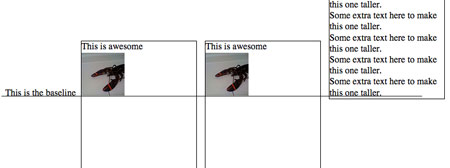
As you can see, each baseline is aligned with the baseline for the text ‘This is the baseline’. That text is not in a <li>, but simply a text node of the parent <ul>, to illustrate where the parent’s baseline is.
Anyway, the fix for this is simple: vertical-align:top, which results in a great looking grid:
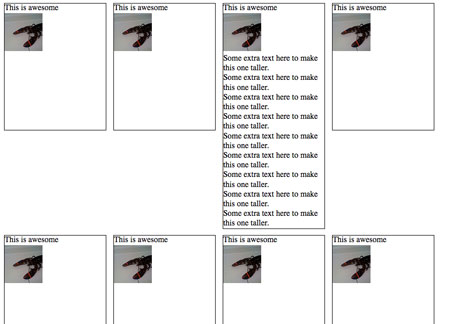
Except it still doesn’t work in Firefox 2, IE 6 and 7.
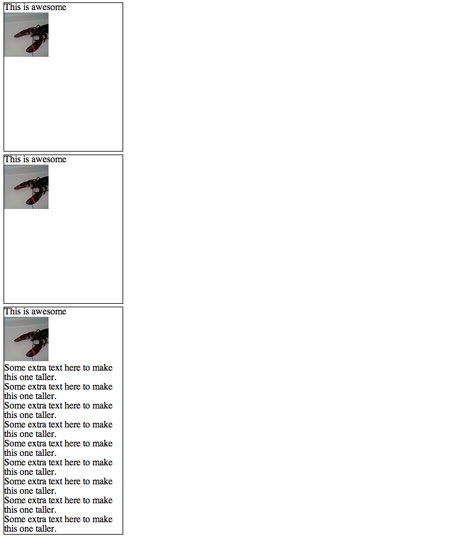
Let’s start with Firefox 2.
Firefox 2 doesn’t support inline-block, but it does support a Mozilla specific display property ‘-moz-inline-stack’, which displays just like inline-block. And when we add it before display:inline-block, FF2 ignores that declaration and keeps -moz-inline-stack because it doesn’t support inline-block. Browsers that support inline-block will use it and ignore previous display property.
<style>
li {
width: 200px;
min-height: 250px;
border: 1px solid #000;
display: -moz-inline-stack;
display: inline-block;
vertical-align: top;
margin: 5px;
}
</style>
Unfortunately, it has a small bug:
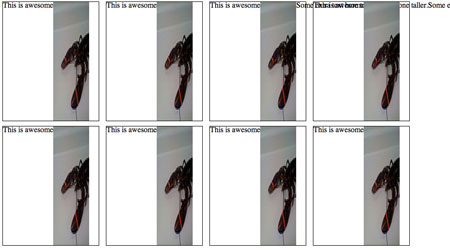
Honestly, I don’t know what causes this bug. But there is quick fix. Wrap everything inside the <li> with a <div>.
<li>
<div>
<h4>This is awesome</h4>
<img src="http://farm4.static.flickr.com/3623/3279671785_d1f2e665b6_s.jpg"
alt="lobster" width="75" height="75"/>
</div>
</li>
This seems to ‘reset’ everything inside the <li>’s and makes them display appropriately.

Now, on to IE 7. IE 7 does not support inline-block, but we can trick it into rendering the <li>s as if they were inline-block. How? hasLayout, a magical property of IE that allows for all sorts of fun! You can’t set hasLayout explicity on an element with hasLayout:true; or anything easy like that, but you can trigger it with other declarations like zoom:1.
Technically, what hasLayout means is an element with hasLayout set to true is responsible for rendering itself and its children (combine that with a min-height and width, and you get something very similar to display:block). It’s kinda like magical fairy dust you can sprinkle on rendering issues and make them disappear.
When we add zoom:1 and *display:inline (star hack to target IE6 & 7) to the <li>s, we make IE 7 display them as if they were inline-block:
<style>
li {
width: 200px;
min-height: 250px;
border: 1px solid #000;
display: -moz-inline-stack;
display: inline-block;
vertical-align: top;
margin: 5px;
zoom: 1;
*display: inline;
}
</style>
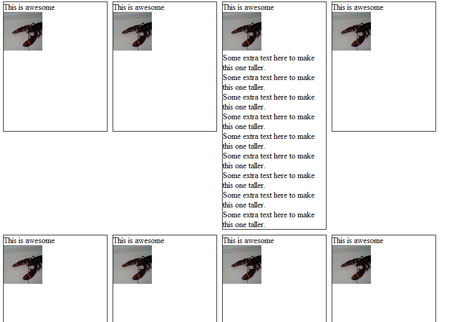
Phew! Almost done. Just IE 6 left:
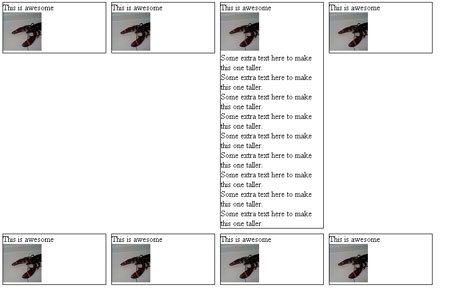
IE 6 doesn’t support min-height, but thanks to its improper handling of the height property, we can use that instead. Setting _height (IE6 underscore hack) to 250px will give all <li>s a height of 250px, and if their content is bigger than that, they will expand to fit. All other browsers will ignore _height.
So after all that work, here’s the final CSS and HTML:
<style>
li {
width: 200px;
min-height: 250px;
border: 1px solid #000;
display: -moz-inline-stack;
display: inline-block;
vertical-align: top;
margin: 5px;
zoom: 1;
*display: inline;
_height: 250px;
}
</style>
<li>
<div>
<h4>This is awesome</h4>
<img src="http://farm4.static.flickr.com/3623/3279671785_d1f2e665b6_s.jpg"
alt="lobster" width="75" height="75"/>
</div>
</li>
Thanks for the elaborate post on inline-block — but honestly, you’ve got to be kidding me. What bad have we done, having to suffer through this on a daily basis?
Fred Wenzel on February 20th, 2009 at 6:46 pmIt’s very cool to see not just the fixes, but an explanation of what’s going on. And when can I borrow your handbook of hacks?
Jeff Balogh on February 20th, 2009 at 9:54 pmWow… -moz-inline-stack. The reason that you need the extra div is that you’re using what’s essentially an XUL stack element. I’m actually rather surprised it works reliably.
Eli on February 20th, 2009 at 11:38 pmWhat -moz-inline-stack did is not a bug — it’s what stacks do. See https://developer.mozilla.org/en/XUL_Tutorial/Stack_Positioning
Dao on February 20th, 2009 at 11:48 pmThanks mate!
jan on February 21st, 2009 at 2:59 amYou don’t need -moz-inline-stack and the additional div, Gecko 1.8 has -moz-inline-box which is more-less like inline-block.
Also, old IEs do support inline-block on elements that are originally inline (like span).
marcoos on February 21st, 2009 at 6:35 amWow, thanks for the great post and workarounds. I’m finally grokking the possibilities of inline-block.
Andrew on February 21st, 2009 at 7:05 aminline-block also works in IE8.
Brian on February 21st, 2009 at 7:36 amreally, that looks pretty ugly, design wise. I’d just make them all a fixed height… truncate the text if you have to.
chris on February 21st, 2009 at 9:41 amGood thing you don’t just use a table, since it’s TABULAR data and all.
Reality Sammich on February 21st, 2009 at 12:00 pmThanks – you’ve perfectly illustrated why tables ARE the answer. Pages and pages of complicated, browser-specific hacks in order to come up with something that’s visually uglier than a table (cause at least the row heights would align in a table).
Go ahead, keep convincing yourself that your “pure” markup is somehow better than tr/td’s – meanwhile i’ll keep running circles around you by coding up better looking pages faster, better looking and easier to understand.
jimmy jj on February 21st, 2009 at 12:45 pmWhen will be the day web-browsers will behave the same way?
Michael on February 22nd, 2009 at 2:21 ami doubt it will be in our life-time
Nice explanation. I wouldn’t spend time doing hacks for that old shitty Firefox 2 anymore though, it’s market share has dropped enough to finally neglect it.
Ronny on February 22nd, 2009 at 2:44 amNice, but if you want your code to be validated you need some more tweaking here:
1. there are better more standard ways to set hasLayout in IE7 then zoom:1 and according to http://www.satzansatz.de/cssd/onhavinglayout.html “min-height” is enough, if it dosn’t (because of display:inline) then overflow:hidden or position:fixed should do the trick.
2. instead of using “_height” you can use the fact that IE6 ignores “!important” when the same property is declared twice for the same selector.
so “height:auto !important; height:250px” can replace the non-standard underscore hack.
3. did you try to set “display:inline” before the “-moz-inline-stack” decleration? it is supposed to work just like the trick you do with FF2 ignoring “display:inline-block”
btw – how important it is to still support FF2?
Tom B. on February 22nd, 2009 at 3:53 amWow! It seems a great solution, thank you for sharing…
I’ll play a little bit with you code
Renato Carvalho on February 22nd, 2009 at 4:32 amHey great work on display:inline-block! It’s the first time I’ve seen such a comprehensive solution:)
One thing though: IE targeting is best done with Conditional comments.* It’s far neater, cleaner and has some chance of not messing up the future.
* http://www.quirksmode.org/css/condcom.html
James John Malcolm on February 22nd, 2009 at 5:16 amThe sooner they get inline-block working properly in all browsers the better – the functionality has worked on images for years so how hard can it be to replicate that functionality for other elements?
Sometimes I think about giving it all up and becoming a farmer.
AndyW on February 22nd, 2009 at 5:18 amWhy all this hacky mess, and not simply table, tr, td, for things who looks like tabular data …
Francois on February 22nd, 2009 at 6:16 am-moz-inline-box wouldn’t work for Firefox 2? Seems a bit messy to have to add markup to make it work, and I thought -moz-inline-box would have done the trick. Usually does for me, anyways. Let me know why that’s wrong
George on February 22nd, 2009 at 6:19 amLoving the description for fixing (*cough* hacking) required for IE6/7.
hasLayout is kinda like LOLcat talk vs. proper use of the English language. Cept not funny after the 100th time.
Kai Chan Vong on February 22nd, 2009 at 7:06 amnice explanation
ionut popa on February 22nd, 2009 at 7:47 amWow – exactly the problem I was trying to fix today! Useful and informative.
Rich on February 22nd, 2009 at 8:07 amVery clever, and even heroic.
But seriously, I got the assignment at the same time as you, and I used a table. Then I left work, ate a cheeseburger, and was well into my second pint of beer while you were still looking up that IE6 _height hack. Ok not really, as I had to write a little more logic to insert the s in the right places, but I was at least done with the cheeseburger.
When I look at that design comp, I don’t see an unordered, bulleted list. I see a table of thumbnails and descriptions. From my point of view, table IS a semantic solution, and it has the wonderful side effect of being both backwards and forwards compatible with any web browser ever produced.
I totally appreciate the value of what you’ve done, and I definitely learned some things about inline-block that I never knew, but jumping through these hoops to avoid a when the design is really a table? No thanks.
Chris Snyder on February 22nd, 2009 at 8:24 amI thought you were looking for “proper, semantic markup”. The CSS above does not validate.
Jeff Milner on February 22nd, 2009 at 10:08 amFINALLY, something to bookmark. I’ve been keeping them stashed away in the back of my head, but one of them generally escapes me every time I need this. Many thanks!
Tim on February 22nd, 2009 at 12:36 pmDid you try to use the Dustin Diaz’s “min-height fast hack”?…I think it is a more elegant solution than using the “underscore hack”: http://www.dustindiaz.com/min-height-fast-hack/
Lucian Lature on February 22nd, 2009 at 12:55 pmEww, you just did the nasty of the nasty in cross browser CSS styling.
If anything, I would have done it the lazy way:
-Set a Character Limit.
Anraiki on February 22nd, 2009 at 1:49 pm-Overflow: Hidden.
Or… wait for it … you could just use a table.
Granted if the content is the entire page, then it would violate the rules on using tables for layout.
However, if the content is–as it appears to be–*part* of the larger page, then using tables to layout that *portion* of the content is acceptable to me and more importantly to my sanity.
http://www.w3.org/TR/html401/struct/tables.html#h-11.1
Foamy on February 22nd, 2009 at 2:12 pmCan I ask, why -moz-inline-stack and not -moz-inline-block?
Jon B on February 22nd, 2009 at 3:17 pm>>What bad have we done, having to suffer through this on a daily basis?
Obviously, we were all wicked, wicked children.
Nosredna on February 22nd, 2009 at 3:43 pmThanks for sharing this trick.
at9t on February 22nd, 2009 at 8:35 pmNow I only miss a js-solution for creating equal heights für each li dependent on the heighest li
Max
Maximilian Böhm on February 23rd, 2009 at 12:01 amThis very good. Especially on galleries
sunil on February 23rd, 2009 at 12:57 amThis reminds me of the age-old (internet years anyway) table vs. CSS debate. Should we always go to great lengths to use CSS even if something that Looks like a table can be implemented using a table very easily? Forms can look like tables (not all of them), and this does too. Hey, we’ve even got a table header here.
Pro table: it’s easier, will scale nicer, and we’re setting fixed widths anyway;
Pro CSS: the number of columns is a presentation issue, and is not supposed to be hardcoded in the HTML
I guess it’s a trade-off between slightly non-standards-compliant ‘hacky’ code, and content/presentation separation purism.
Jay on February 23rd, 2009 at 12:59 amBasically the special case of the behaviour of a stack when it contains a single element is to size itself to the same size as that element or to stretch the element to its size depending on CSS size constraints, which is exactly what you need to simulate an inline block.
Neil Rashbrook on February 23rd, 2009 at 1:43 amEasier to use a , innit?
djerdos on February 23rd, 2009 at 1:46 amSurely setting a fixed width will trigger hasLayout, without requiring zoom:1 as well. But thanks for a great post, should help me fix a legacy bug.
Emma on February 23rd, 2009 at 1:58 amMay I suggest … Hacks like *display: inline; and _height should disappear and be replaced by conditional comments calling stylesheets only parsed by IE.
Felipe on February 23rd, 2009 at 2:03 amThat being said, -moz-inline-stack is a very interesting discovery I’m impatient to test, thanks!
How about -moz-inline-block to avoid those extra divs?
Magnar on February 23rd, 2009 at 2:26 amThere is one weak point in this method. If you want pixel-perfect spacing between boxes, you need to control word-spacing somehow. It depends on source code formatting – if you have some white space between LI tags, then the boxes will be separated by normal space depending on specified font and font size. This is very dificult to eliminate across browsers. The only safe method I have found is to add { font-size: 0; letter-spacing: -1px; } on UL element and then revert it on LI elements (but then font-size can only be specified in px).
karf on February 23rd, 2009 at 4:13 am@jimmy jj, Francois, Chris Snyder, Foamy, Jay,
1. Although I’m all for using tables when tabular data is to be displayed or when I’m too lazy to think CSS for a small thing I can do with a simple table, this is *not* tabular data. Where would you place row and column headers? This is a list of images. You don’t *have* rows and columns, you could place they one beside another and you’ll have exactly the same content semanticly* speaking (*is that a word?).
2. What would you do if you have to implement a sortable? That’s exactly what happened to my layout of a photo album. First iteration it was only a list of photos, easy as cake, I used a table and off we go. But then they asked me to implement sorting of photos. You cannot use a table for that. Think about for a minute then think again if a table makes sense.
Daniela on February 23rd, 2009 at 4:27 amFor those who think table layout of this design is proper I have this to say… maintainability…. let’s say that your boss all of sudden says I want this to be 2 columns not 4… so you go into your html and change your tables… then he later says no I want it 6 columns… you then have to go into your html again to change it… this can go on and on… And since I coded it in a list with css controlling layout all I have to do is change one line of css… I don’t have to fuss with however many HTML pages I have with this code.
If the design above is truly tabular data then the html should be coded with a table, however the information above is not tabular data. Therefore the implementation on this site is correct. Please take a look at why tables suck for layout here : http://www.hotdesign.com/seybold/everything.html
Gmyster on February 23rd, 2009 at 5:00 amIt works, but is definitely not pretty…I would agree completely with what Chris had to say: http://blog.mozilla.org/webdev/2009/02/20/cross-browser-inline-block/#comment-188047
Either truncate, or use jquery/JS to make all the li’s have the same height as the tallest item, in conjunction with the inline-block fix for a nice degradation.
matt on February 23rd, 2009 at 6:09 amI agree that it’s important to stick to “standards” and use CSS for everything you can, but it seems that people try to hard to hack the code and lose track of things like, I dunno – deadlines.
Why not a table? This type of application of code is most likely going to be an issue with tabular data anyways, and that’s what tables are for.
Or, since it’s most likely being generated dynamically – why not just throw a “clear” in there after 4 items? You’ll be using a loop, just add a counter.
fluidByte on February 23rd, 2009 at 6:31 amUm, this is NOT tabular data, for those table junkies in the room. There is no row-column relationship; every item is at the same hierarchical level.
If this content is delivered from a database, the effort to create a control that will calculate and render the right number of table rows and columns is much greater than a control that will simply output a list, leaving the presentation to CSS. It’s worth the extra effort to figure out the CSS. And I’ll go for that beer a little later, when I’m done, and it will taste much better.
Eric on February 23rd, 2009 at 7:23 am@Maximilian Böhm: Have you looked at http://www.filamentgroup.com/lab/setting_equal_heights_with_jquery/ ?
Joe on February 23rd, 2009 at 7:26 amAll you people suggesting these elaborate table layouts are a bunch of arcane time-wasters. By far the quickest way to do this is to save the original mock as a gif.
fluffyb on February 23rd, 2009 at 7:31 amNow I’ve got time for a nice lobster thermador and a bottle of bollinger while you scrabble around for your cheeseburgers.
The designers and business people now say they want sixteen on a row, and the image size has halved, whilst the copy has doubled in amount.
This technique will still work.
Actually, no, now the images are double the size, the copy’s four times as much and on the right hand side. They want the picture and text items to be stacked vertically:
This technique will still work, as the content is separate from how it looks.
Dan Eastwell on February 23rd, 2009 at 8:33 amA very informative post, but…I agree with Reality Sammich, IMHO a table is more suited.
The data is tabular, whether it includes images or not. And as such, should be presented to users that way. For the purist who thinks it is impeding the separation of content and presentation, the columns are a side effect of the content, not an added visual decoration. In this case, columns are part of the content, and not a presentation issue.
Jeff on February 23rd, 2009 at 9:02 amAmazing work!
Table vs List markup: If you have the requirement that items dynamically appear and disappear (inplace editing, drag n drop, or realtime updates) then this solution would be a much better fit than a Table based layout, as you would have to do a lot of DOM manipulations as items entered and left the page.
pedantic on:
Austin King on February 23rd, 2009 at 9:19 amI disagree that a table layout would capture more of the semantics of the data; neither the columns nor the rows organize the data in a particular way. The periodic table of elements obviously meet this requirements, but a big list of T-shirt designs does not.
Cool. Have you checked out Google’s “setInlineBlock” method?
Dustin Diaz on February 23rd, 2009 at 10:28 amhttp://code.google.com/p/doctype/source/browse/trunk/goog/style/style.js#685
@fluidByte
<>
Yep, exactly, an extra class with clear:left applied to every first item in the rows would have do the trick with no pain.
One could argue that applying an extra class every n items could be unpratical or even unfeasible in some cms scenario, but I’d like to point out that you still need it for setting the margins exactly as in the photoshop comp.
The second screenshot has an extra margin on the right of the rows, due to the fact that every list item box in the grid has the same margin values.
Anyway, even if the example chosen was not the best hook to introduce this inline-block trick, I really dug the tutorial, it’s something valuble to keep at hand.
abu on February 23rd, 2009 at 11:23 amWow, such a big breakthrough. Why did you not mention this as a replacement for the extremely hacky centered floats???
Kean on February 23rd, 2009 at 3:05 pmObligatory:
http://giveupandusetables.com/
James on February 23rd, 2009 at 4:06 pmA traditional image gallery IS tabular data. This instance might only have 2 items, but it is still relational. In proper relationship database design, there are many instances where you would have only 2 columns (an ID and a name for a category, for instance), why should an image gallery be any different?
Think outside the table. You’re willing to bend the laws of physics to make CSS turn a bunch of divs (or whatever your element of choice is), but you can’t think to do the same thing to turn table rows to do the same thing? Yes, a table can be made to look like that screenshot above. Maybe not in every version of IE, but it can still be done. It’s more important to have the proper markup than to have the proper appearance for browsers who can’t keep up.
@Austin King Says:
> Table vs List markup: If you have the requirement that items dynamically appear and disappear (inplace editing, drag n drop, or realtime updates) then this solution would be a much better fit than a Table based layout, as you would have to do a lot of DOM manipulations as items entered and left the page.
And you don’t have to do this with lists? You’re joking, right? Just because sorting lists is all the rage these days and getting code to do it is relatively easy, that doesn’t mean it can’t be done with tables as well. In fact, here’s a nice example for you:
http://www.isocra.com/2007/07/dragging-and-dropping-table-rows-in-javascript/
Regardless, this code has merit, even if it was applied to the wrong HTML elements for the chosen content.
c. on February 23rd, 2009 at 4:53 pmAs the owner and developer of an online website building tool, I have to agree with a lot of other peeps on this post – this is way to much work for something that works just fine with tables.
The whole debate about tables only being used for data is blurry at best (aren’t images data?), and using tables is W3C compliant and completely valid XHTML/HTML and CSS. Plus, it’s not a hack and won’t break (or shouldn’t break) with future versions of all the major browsers.
My experience has shown me that users of or website builder and their readers could care less.
Why beat yourself up for nothing? Just use tables….
Heath Huffman on February 24th, 2009 at 8:11 amWhat about this? You get the same effect with no effort
/* Firefox */
.class {display: table-cell;}
/* IE */
.class {display: inline-block;}
PS: don’t use this method for input tags, they become invisible in Opera
Miro on February 24th, 2009 at 7:37 pmI, too, ran into this problem, but I gave up much quicker than this.
Truly, designing for the masses (and the browsers) is not for the faint-hearted.
Cel on February 24th, 2009 at 9:02 pmThe reason not to use tables here is that perhaps we have a fluid-width situation. If we want this content to expand across the entire screen space available, but only that far, this is the best solution
Matchu on February 25th, 2009 at 7:54 amhello , just very happy to see this article , a few month ago i offered this solution on a french forum (i’m french myself) to the exact same problem …
Well just looks like english community is much more open minded and gets it easily.
But , do not use : -moz-inline-box for FF2 and lower ,
-moz-inline-stack is just fine , the extra element needed to fixe stacking/sizing is as well can be useful in IE useful to hold some differences , like white-space …. (ex:yidille.free.fr/plux/valign/uploads/centre-inline-stack.html)
even then , some backgrounds bugs issue may appear , so this inline-stack element should be used as less as possible to hold the design of a page …
Inline-block is used to fixe layout ‘attitude’ , as well in FF>2(or else) than IE .(to hold floatting elements for instance) .
To provoque : display:inline-block; in IE 7 and less , on blocks element and behave like else where , you need : display:inline; + zoom:1; through conditionnal Comments .
FF2 will soon not matter anymore , but IE 7 will survive for a while , so be glad to use Conditionnal Comments , you may drop -moz-inline-stack; workaround
.
GCyrillus
gcyrillus on March 2nd, 2009 at 7:14 amoups,
gcyrillus on March 2nd, 2009 at 7:21 amof course , we all understand that the point here , is not to kill tables , but to have a more efficient use of css … More you know , easier it is to choose a good option .
that’s all folks , no troll inside
thanks !
Using your example, what can we do if we want to center horizontally & vertically the images shown in the layout? Because of all the stuff applied to hack between browsers, now any align property used in the inside div doesn’t work… at least in ie7||ff3
dtorres on March 9th, 2009 at 1:42 pmHi,
Great fix – it really helped me out today.
I go along with the “use tables” argument to a certain extent. However, tables aren’t option for me as I’m using it in our CMS that uses ULs and LIs in the menu in a standard way across sites and I want to style it a number of different ways depending on the client and layout requirements.
Anyway, thanks.
Cheers
G.
GT on March 10th, 2009 at 10:14 amhello all.
am not sure if this the rite place to ask about my probe.
is anybody out there use this cross-browser inline block in wordpress-mu forntpage?
i try to use it, but when i call the wp_content() function, it displays the same text in each of my block.meanwhile i try to display differ text for differ block.
dydi nadya on March 16th, 2009 at 1:01 amwhat should i do?and another this is i want each of the block’s content can be added from the admin panel..
is anyone solve this kind of probe.pls help me.am a noob in this wordpress-mu and cross-browser. i try to get some help from wordpressmu forum..but no one seems to give me detail explaination..any help much appreciated..
Great effort, but it shows errors when I validate in w3c
Major karthik on March 16th, 2009 at 9:02 pmThis is a complete oxymoron if ever I have seen one. This is a table, you can code it in a table with a caption at the top, layout with th’s and td’s and you eliminate all of this nonsense and ridiculous hacks. By the way as written by Tantek Celik widely that * hack is not forward thinking. The semantics of this are completely shot and I warn everyone to stay well clear and implement a sematic table for this type of content. Table’s were built for this purpose.
Kevin Rapley on March 22nd, 2009 at 3:53 amGreat post,
Thanks for the insite!
Just wanted to say to all the “anal retentive” people giving comments about the layout being tabular data:
If this layout is fluid, which I’m guessing it is, when you view the site on a wider resolution screen, the above example will shift the blocks around allowing for any number of blocks per-line. This is not possible with tables, you have to specify the number of blocks/cells and stick to it.
SO… think before you post.
Also
Roark on March 23rd, 2009 at 12:20 amOne solution I found to this that maybe isn’t quite as reliable but a lot shorter is to use “display: inline-block” in the CSS, then a server-side variable that on detecting IE inserts the code “style=’display: inline’” into the HTML for the element.
This results in the display being corrected in these browsers, but will only work when added to the HTML as a style= declaration and does not work from the CSS file.
David on March 25th, 2009 at 7:27 amFor those complaining about W3C CSS validation, rethink what it takes to get the job done. In their new site beta even W3C uses the IE “_” hack to get everything working. When the browser doesn’t support compliant code, it’s impossible to code compliantly.
The so overlooked usefulness of using in place of the in a situation such as this is that IT’S DYNAMIC. A table is set and unmovable, while the use of this method allows the content to flow with the window size. If the window is large enough there may be 8 or 10 elements shown, where a small screen will only show 4 or 5. For anyone that cares about the viewers of their page, this is a definite benefit.
I only use tables when there are give a set number of columns. Floating around an address list would be absurd, but this was an excellent example of when and how to use the dynamic capabilities of CSS to extend flexibility of your website.
Trevor Norris on March 26th, 2009 at 10:43 ameverything works fine on every browser in the universe except for fucking shitty microsoft internet explorer.
i’ve tried many things to fix the inline-block problem with ie and nothing works – including this article and many others.
a hassan on March 31st, 2009 at 6:09 amThis is not a tabular presentation at all. You can’t have sequential cells in a table and expect it to be usable at all.
Example:
A | B | C
D | E | F
G | H | I
This not a usable/accessible table. What would the required header fields be labeled? “In this column, we have items A, D, & G.”
To represent the data as a table, you need to normalize the data into columns or rows.
If by rows, each item would be a row. Each item property (thumbnail, title, description) would be columns. As follows.
item | thumbnail | title | description
item A |
item B |
item C |
If by columns, each item would be a column. Each item property would be rows. As follows.
property | item A | item B | item C
thumbnail |
title |
description |
So, you could represent that information in tabular format, but not as depicted in the original design. That requires a list (e.g., ul/ol & li) or just sequential elements (e.g., div).
-AH
Alex on April 5th, 2009 at 11:01 amI still can’t believe that people push tables for this sort of issue… I guess your all still manually typing in every piece of data, using inline page styles to change text colour and size instead of proper markup… using WYSIWYG editors like frontpage to bloat there code…
Think about real world website, where the content is dynamic… instead of the image taking up one ‘cell’ it takes up 2, then one then 3 then 1 then 3 then 1 then 2. How much fun are you going to have trying to use colspan to keep your tables in line.
Tables should only be used for presenting tabular data… not for layout issues like this and Alex has nailed it on the head with his expination of this. I think that most of the ‘hacks’ here can be handled using compliant code as described above using conditional statements that should then be moved out into browser specific stylesheets so that they don’t require lads on compliant browsers. A combination of SPAN (ie allows in-line block on these elements) and divs will easily handle this design. Good break down article, that gives you a good direction on what to look out for…
BoonDog on April 14th, 2009 at 2:51 amA really great article as far as clarity and usefulness is concerned. Still, if I was working on a project that needed to get done, I would probably just use a table.
For all the talk of “it’s not semantically correct” and “it’s not tabular data” yes, sure. But browser workarounds left and right are not much better. You would rather shove browser hacks into your code, and I would rather forget about whether the data is “tabular” because it makes no difference to the end user in 99% of cases.
PS the example given in the article doesn’t give sequential elements. If the project in question does have sequential elements then yes, an OL might be worth thinking about (funny you suggest a UL for sequential data
)
Frug on April 14th, 2009 at 5:18 amThanks for the great article! I had just launched a new design on my blog and forgot I had upgraded to IE 8 at home.
When I got to work none of my inline-block elements looked right because we are required to stay on IE 7 for now. This was a great quick fix.
I know better than to launch something without doing browser version checking (I already had checked the latest versions of IE, FF, and SF) but must have been up too late at night. Doh.
Tim Franklin on May 5th, 2009 at 4:26 amIts interesting to see hwo people think anything
‘grid-like’
is a
‘table’.
A dynamic table would usually add more rows at the end of the table, and the number of columns is always set. Or far less commonly the other way round.
This means if you want to add a new element, then you add it as a new row after the last row (or possibly insert it in between some).
Here the rows are made up of a number of boxes, BUT the number of boxes in a row isn’t set (that is dynamic), which means it’s not necessarily tabular.
Also, a new element we want to insert here is just a box. A box isn’t a new row, it is part of a row. Again, not looking like a table.
Only when the number of boxes in a row is set, then the data becomes tabular.
Here, the data is actually a list of boxes, which are displayed in-line, on multiple lines. the width of the boxes on a line determines how many can fit on one line before the rest are put on the next line and so on. This is a much more flexible format, and one that should be implemented with CSS.
You can think of the boxes as words in a sentence. In a text editor, you write your sentence, going to the next line as you run out of space for the next word [/box]. Thanks to computers, if you then insert a word in your sentence on your top line, it will usually shove all the succeeding words along and over to the next line.
Matt on May 13th, 2009 at 3:12 amA sentence is a list of words, usually put on multiple lines for easy-to-readness. This is exactly what the box structure is in this blog.
Table junkies, just resize your browser window. With this solution you can have a fluid design. With a table you get scrollbars…
Simon on May 31st, 2009 at 5:57 amDitto to Matt. More to the point is that “tabular data” is data for which the meaning of each chunk is dependent on the intersection of the row / column in which it appears; a database table is a great example. The grid structure doesn’t define it as tabular data. It’s the other way around: the most convenient visual representation of tabular data is a grid structure.
A group of pictures is just a group of pictures. Order may be important, but in this case it doesn’t appear that the meaning of the pictures depends on the row / column in which they fall.
Thanks for helping lead the way toward getting grids without tables. Browser authors will not bother to improve their software if the demand isn’t there, and figuring out tricks like this makes it easier for the rest of us to reach the ideal rather than giving for the sake of convenience.
Besides all that purism, there’s the practical matter of re-using markup for different layouts under different circumstances by changing only the CSS. That ability is pretty valuable in my book.
Kent on June 14th, 2009 at 9:46 pmI don’t want use zoom:1 & *display:inline in IE6&IE7. Do anyone know how to do? GOOGLE did it!
ctoicqtao on June 23rd, 2009 at 11:01 pmGreat article. Saved my skin when trying to horizontally centre some floated list items in an unordered list. Converted to inline-block and it’s too easy!
alex on July 9th, 2009 at 6:08 pmSorry, but with all of the various browsers / versions and the lack of consistent CSS support tables make more sense on things like this. The argument about “what if the boss decides that …” is null and void. There should already be an understanding in place that some things should be decided BEFORE coding begins. If that is not possible or there are last minute changes (very common) use quick mock-ups or comps to get an agreement and then go adjust the table. Changes that happen like this are simply going to take time – plain and simple. That is what we get paid to do. I hope that one day all of the browsers will render everything the same and there will be 1 set of standards that they all adhere perfectly to. I’ll then be able to take a vacation.
Spendicus on July 11th, 2009 at 8:11 amFantastic, this saved me from reverting to tables! Thank you!
Jason S on July 13th, 2009 at 8:24 pmFinally I found a great explanation and the best solution. Thanks a lot.
Juarez P. A. Filho on July 15th, 2009 at 6:02 pmGreat solution… however, maybe there should have been a different way of looking at this problem rather than trying to solve the problem in hand….
Let’s take XP and vista as examples of how they handle the same situation as yourself, via their “Thumbnail” view of files.
If the file name is longer than a certain name, they cut it off with “…” (you’ll see it in Vista most visibly).
So given that you already show a thumbnail picture (giving a fairly good idea of what people might click on), why not just do a check on the “title” and “by” text to cut them off at a certain length so you know they will never include any more than x number of characters. Wrap them in a span and then put the title of “title – by” in it so when they hover it shows the full description?
That way you can go back to your great float method and jus set the height to be in em so it only takes into account the resize of text and in which case, all heights would resize the same too.
Maybe that’s just a far easier way of solving a problem?
I mean, let’s face it, your design shouldn’t have to take into account the fact that the text might contain in between 50 characters and 1000 characters. You have to draw a line on what is expected.
Even with your solution, why on earth would anyone except the visual layout of that to look nice if you have one block that is excessivly higher than another??
But sure, your solution solves it.
Adam on August 2nd, 2009 at 7:21 amTables are for designers that simple don’t understand the difference between data and layout, but then, if the browsers let it be and nobody with a screen reader complains… what the hell aye?
Yeah baby! Thanks for this great post, this is the ideal solution for a new website projekt of mine! THANKS a lot.
Ben on August 3rd, 2009 at 7:02 amTabular Data!!!
Tabular Data?!?
Tabular Data??????
What are you going on about, this is NOT tabular data.
Go and read more on tables and you ‘may’ just learn a little more.
And in response to what the other amateur said – You go and run circles around me and make quick pages. I’ll continue to make the great pages I make….and “Oh Wait for it” (as you monkeys say!) When it’s time to update or add information to my page…I’ll run circles around YOU!.
I like this… It’s definitely a better solution to using tables for NON-TABULAR data…
Russ on August 3rd, 2009 at 8:51 amuh this is ok and all, good to know, but you can easily do this by just wrapping every 4 items in a div, clearing the float with the wrapper, and floating each element left. of course that only works in a fixed width layout but most are fixed width nowadays anyway.
mike funk on August 3rd, 2009 at 9:47 pmIs the haslayout trigger really necessary here? I’m getting the exact same result by feeding only display: inline to IE 7 and below.
Anders on August 4th, 2009 at 1:27 amGreat Post
Bradford Sherrill on August 4th, 2009 at 6:54 amthinking ‘square’ is just like seeing a straight road and design your car without a steering wheel.
The fact is:
1) with db-driven data you have to deal with empty slots;
2) sooner or later you might need to make it more complex;
3) coding a table requires more markup and slows the downloading down;
4) mobile apps might not be rendering table markup the proper way;
5) never thought about people who need screen readers? just try yourself and say: this is a list of images AND this is a table in which we have images in rows and images in columns.
However, I don’t regret using fixing heights and widths, since non-consistent data entry might lead the interface to look quite bad.
paolo on August 6th, 2009 at 6:52 amPaolo is right – for all you idiots saying to use tables what do you say to your boss/client when they want a mobile version of the page created? Are you going to suggest a bit of user agent sniffing and redirect them to a page with only one image/caption per TR?
Using CSS and a list is the RIGHT way to do this. I don’t agree with having the hacks in the main stylesheet, move them to a conditional stylesheets instead.
Sean Curtis on August 6th, 2009 at 5:52 pmThose saying use a table because it’s tabular data. Well, do any of you understand what tabular data is? It’s not something that lines up in a grid, it’s data, which is best displayed in a table. The type of data you’d use a spreadsheet program to create and edit.
Liam on August 12th, 2009 at 5:39 amWell this is a long *** thread. But I have an issure with this display inline-block. and need a good answer please.
layout is like this:
How do I get divs 2 and 3 to line up next to each other. I don’t want to use float or table. Tried everything to get it to work , got it once and then decided to tidy up the code and God knows what i deleted but the solution is evading me now.
TableTopDancer on August 27th, 2009 at 7:28 amI haven’t tested the zoom:1 yet, but there is another IE6 hack:
. {
display: inline-block; // FF+
}
. {
*display: inline; // IE5.5+
}
It’s basically the same thing, forcing a new instance of the class to be applied, but only for IE. — note: replace . with your class, ID, or element (e.g. .active {}, div{}, #elementID {}
vol7ron on September 29th, 2009 at 7:14 amI put this method to use on a site that has several different grid layouts going on, and it works great except for one thing. I’m hoping someone reading this can help. In one of the grid layouts, the first few li’s have a background-color set, to indicate that they are ‘active’. The design calls for there to be *no* space between the li’s, so that the background-color is seamless. But using this css method, there is a mystery 5px right margin on every li. I’ve gotten rid of all css margins and padding on the li’s, and it’s still a complete enigma. Anybody else run into this? I’m seeing this in FF 3.0 & 3.5, IE8 (not 6 or 7), and Safari. So the ‘inline-block’ tacks a phantom 5px margin on block-level elements. You can see my test here: http://www.lesliesommer.com/tests/grid.html
supahank on October 20th, 2009 at 9:45 am