26
May 11

Record your freshness

I often like to split patches up into independent pieces, for ease of reviewing by both reviewers and myself. You can split off preparatory refactorings, low-level mechanism from high-level users, features from tests, etc., making it much easier to evaluate the sanity of each piece.

But it’s something of a pain to do. If I’ve been hacking along and accumulated a monster patch, with stock hg and mq I’d do:

  hg qref -X '*'                  # get all the changes in the working directory; only
                                  # needed if you've been qref'ing along the way
  hg qref -I '...pattern...'      # put in any touched files
  hg qnew temp                    # stash away the rest so you can edit the patch
  hg qpop
  hg qpop                         # go back to unpatched version
  emacs $(hg root --mq)/patchname # hack out the pieces you don't want,
                                  # put them in /tmp/p or somewhere...
  hg qpush                        # reapply just the parts you want
  patch -p1 < /tmp/p
  ...                             # you get the point. There'll be a qfold somewhere in here...

and on and on. It’s a major pain. I even started working on a web-based patch munging tool because I was doing it so often.

Then I discovered qcrecord, part of the crecord extension. It is teh awesome with a capital T (and A, but this is a family blog). It gives you a mostly-spiffy-but-slightly-clunky curses (textual) interface to select which files to include, and within those files which patch chunks to include, and within those chunks which individual lines to include. That last part, especially, is way cool — it lets you do things that you’d have to be crazy to attempt working with the raw patches, and are a major nuisance with the raw files.

Assuming you are again starting with a huge patch that you’ve been qreffing, the workflow goes something like:

  hg qref -X '*'
  hg qcrecord my-patch-part1
  hg qcrecord my-patch-part2
  hg qcrecord my-patch-part3
  hg qpop -a
  hg qrm original-patchname
  hg qpush -a

Way, way nicer. No more dangerous direct edits of patch files. But what’s that messy business about nuking the original patch? Hold that thought.

Now that you have a nicely split-up patch series, you’ll be wanting to edit various parts of it. As usual with mq, you qpop or qgoto to the patch you want to hack on, then edit it, and finally qref (qrefresh). But many times you’ll end up putting in some bits and pieces that really belong in the other patches. So if you were working on my-patch-part2 and made some changes that really belong in my-patch-part3, you do something like:

  hg qcrecord piece-meant-for-part3             # only select the part intended for part3
  hg qnew remaining-updates-for-part2           # make a patch with the rest of the updates, to go into part2
  hg qgoto my-patch-part2
  hg qpush --move remaining-updates-for-part2   # now we have part2 and its updates adjacent
  hg qpop
  hg qfold remaining-updates-for-part2          # fold them together, producing a final part2
  hg qpush
  hg qfold my-patch-part3                       # fold in part3 with its updates from the beginning
  hg qmv my-patch-part3                         # and rename, mangling the comment

or at least, that’s what I generally do. If I were smarter, I would use qcrecord to pick out the remaining updates for part2, making it just:

  hg qcrecord more-part2    # select everything intended for part2
  hg qnew update-part3      # make a patch with the rest, intended for part3
  hg qfold my-patch-part3   # fold to make a final part3
  hg qmv my-patch-part3     # ...with the wrong name, so fix and mess up the comment
  hg qgoto my-patch-part2
  hg qfold more-part2       # and make a final part2

but that’s still a mess. The fundamental problem is that, as great as qcrecord is, it always wants to create a new patch. And you don’t.

Enter qcrefresh. It doesn’t exist, but you can get it by replacing your stock crecord with

  hg clone https://sfink@bitbucket.org/sfink/crecord # Obsolete!

Update: it has been merged into the main crecord repo! Use

  hg clone https://bitbucket.org/edgimar/crecord

It does the obvious thing — it does the equivalent of a qrefresh, except it uses the crecord interface to select what parts should end up in the current patch. So now the above is:

  hg qcref                 # Keep everything you want for the current patch
  hg qnew update-part3
  hg qfold my-patch-part3
  hg qmv my-patch-part3

Still a little bit of juggling (though you could alias the latter 3 commands in your ~/.hgrc, I guess.) It would be nice if qfold had a “reverse fold” option.

Finally, when splitting up a large patch you often want to keep the original patch’s name and comment, so you’d really do:

  hg qcref                 # keep just the parts you want in the main patch
  hg qcrec my-patch-part2  # make a final part2
  hg qcrec my-patch-part3  # make a final part3

And life is good.


17
May 11

mozilla-central automated landing proposal

This was originally a post to the monster thread “Data and commit rules” on dev-planning, which descended from the even bigger thread “Proposing a tree rule change for mozilla-central”. But it’s really an independent proposal, implementable with or without the changes discussed in those threads. It is most like Ehsan’s automated landing proposal but takes a somewhat different approach.

  • Create a mozilla-pending tree. All pushes are queued up here. Each gets its own build, but no build starts until the preceding push’s build is complete and successful (the tests don’t need to succeed, nor even start.) Or maybe mostly complete, if we have some slow builds.
  • Pushers have to watch their own results, though anyone can star on their behalf.
  • Any failures are sent to the pusher, via firebot on IRC, email, instant messaging, registered mail, carrier pigeon, trained rat, and psychic medium (in extreme circumstances.)
  • When starring, you have to explicitly say whether the result is known-intermittent, questionable, or other. (Other means the push was bad.)
  • When any push “finishes” — all expected results have been seen — then it is eligible to proceed. Meaning, if all results are green or starred known-intermittent, its patches are automatically pushed to mozilla-central.
  • Any questionable result is automatically retried once, but no matter what the outcome of the new job is, all results still have to be starred as known-intermittent for the push to go to mozilla-central.
  • Any bad results (build failures or results starred as failing) cause the push to be automatically backed out and all jobs for later pushes canceled. The push is evicted from the queue, all later pushes are requeued, and the process restarts at the top.
  • When all results are in, a completion notification is sent to the pusher with the number of remaining unmarked failures

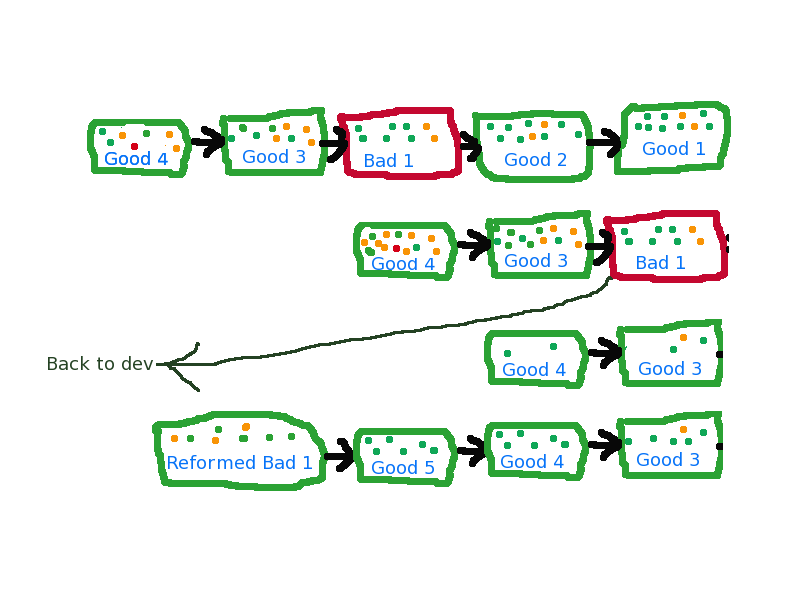
Silly 20-minute Gimped-up example:

  1. Good1 and Good2 are queued up, followed by a bad push Bad1
  2. The builds trickle in. Good1 and Good2 both have a pair of intermittent oranges.
  3. The pusher, or someone, stars the intermittent oranges and Good1 and Good2 are pushed to mozilla-central
  4. The oranges on Bad1 turn out to be real. They are starred as failures, and the push is rolled back.
  5. All builds for Good3 and Good4 are discarded. (Notice how they have fewer results in the 3rd line?)
  6. Good3 gets an unknown orange. The test is retriggered.
  7. Bad1 gets fixed and pushed back onto the queue.
  8. Good3’s orange turns out to be intermittent, so it is starred. That is the trigger for landing it on mozilla-central (assuming all jobs are done.)

To deal with needs-clobber, you can set that as a flag on a push when queueing it up. (Possibly on your second try, when you discover that it needs it.)

mozilla-central doesn’t actually need to do builds, since it only gets exact tree versions that have already passed through a full cycle.

On a perf regression, you have to queue up a backout through the same mechanism, and your life kinda sucks for a while and you’ll probably have to be very friendly with the Try server.

Project branch merges go through the same pipeline. I’d be tempted to allow them to jump the queue.

You would normally pull from mozilla-pending only to queue up landings. For development, you’d pull mozilla-central.

Alternatively, mozilla-central would pull directly from the relevant changeset on mozilla-pending, meaning it would get all of the backouts in its history. But then you could use mozilla-pending directly. (You’d be at the mercy of pending failures, which would cause you to rebase on top of the resulting backouts. But that’s not substantially different from the alternative, where you have perf regression-triggered backouts and other people’s changes to contend with.) Upon further reflection, I think I like this better than making mozilla-central’s history artificially clean.

The major danger I see here is that the queue can grow arbitrarily. But you have a collective incentive for everyone in the queue to scrutinize the failures up at the front of the queue, so the length should be self-limiting even if people aren’t watching their own pushes very well. (Which gets harder to do in this model, since you never know when your turn will come up, and you’re guaranteed to have to wait a whole build cycle.)

You’d probably also want a way to step out of the queue when you discover a problem yourself.

Did I just recreate Ehsan’s long-term proposal? No. For one, this one doesn’t depend on fixing the intermittent orange problem first, though it does gain from it. (More good pushes go through without waiting on human intervention.)

But Ehsan’s proposal is sort of like a separate channel into mozilla-central, using the try server and automated merges to detect bit-rotting. This proposal relies on being the only path to mozilla-central, so there’s no opportunity for bitrot.

What’s the justification for this? Well, if you play fast and loose with assumptions, it’s the optimal algorithm for landing a collection of unproven changes. If all changes are good, you trivially get almost the best pipelining of tests (the best would be spawning builds immediately). With a bad change, you have to assume that all results after that point are useless, so you have no new information to use to decide between the remaining changes. There are faster algorithms that would try appending pushes in parallel, but they get more complicated and burn way more infrastructural resources. (Having two mozilla-pendings that merge into one mozilla-mergedpending before feeding into mozilla-central might be vaguely reasonable, but that’s already more than my brain can encompass and would probably make perf regressions suck too hard…)

Side question: how many non-intermittent failures happen on Windows PGO builds that would not happen on (faster) Windows non-PGO builds?


20
Apr 11

Wading through history

Recently — well, actually, by now it wasn’t recently at all — I received a review request for a patch to JSD. It fixed an intermittent crash when using Firebug on a page that went into an endless stack-eating loop. A couple of people had worked on reproducing it, and the exact conditions were a little flaky, so I first tried it out myself. Kaboom! Yay!

So I imported the patch just to verify that it fixed the problem. Before compiling with it, I updated my tree to the latest version. Why? I don’t know. Just because it’s what I usually do. It seemed like a good idea at the time.

Only it wasn’t. It was a really, really dumb idea. I was changing two variables while trying to test one of them, and I got what I deserved: it stopped crashing after the patch, but when digging in to verify that it really was behaving as intended, I discovered it still wasn’t crashing.

This was just before the All Hands, and although I poked at it every few days, I didn’t make any headway: the patch seemed good, but I really wanted to confirm that it fixed the crash. (There were reasons why I was a little skeptical, but it’s not really relevant here.)

Eventually, when I had some time to think about it properly, I realized the best thing to do would be to revert to the older version that crashed for me. But how to find it?

One way would be to binary search nightlies. But I happened to be on a poor network connection, and downloading nightlies was insanely slow.

Also, I thought I should be able to do better. I run with an mq extension (mq = Mercurial Queues) that commits my patch queue on any change. Get it at git://github.com/hotsphink/mqext.git (I really should switch to bitbucket, rather than pointlessly restricting my audience to people who are minimally comfortable with both git and hg.) So all I had to do was to go back to the point where I imported the patch from bugzilla.

Finding the right moment was easy: ‘hg log –mq’ showed me all the changes made to my patch queue, one of which was commented “IMPORT: bz://643360” (an autogenerated comment courtesy of mqext.)  That was changeset 026ac43e9114. Yay!

But that changeset is for my patch queue, not my source repo. Fortunately, mq stores ‘parent’ fields in patch files that give the source repo changeset id that a patch was applied on top of. I’ll skip a number of failed attempts to track through this, and just give my final recipe:

  1. (already described) hg log –mq to find the appropriate changeset in the patch queue repo.
  2. cd to .hg/patches and run hg cat -r changeset series. This is because you need to know the names of the patch files in order to look at them — or specifically, the name of the first patch file, because it’s the only one whose parent will still be in the source repo. All other patches’ parents will be the source repo with mq patches applied to them, and will have been stripped out of the repo due to intervening actions. Because hg (or rather, mq) is not interested in preserving history.
  3. hg cat -r firstpatchname and look for the “# Parent changeset” line.
  4. cd back to your source repo and fetch that revision however you want — update to it, or clone a repo with it, or whatever.

I’m guessing this little recipe isn’t going to be useful to very many people, but I wanted to write it out for myself. So phbbbtt!!!


08
Mar 11

Work Configuration

Inspired by Nicholas Nethercote’s description of how he sets up his tracemonkey work environment, I thought I’d describe my work configuration and how it differs from njn’s.

Like Nick, I work almost entirely off of the tracemonkey tree these days, and mostly within js/src. I don’t use the js shell all that much compared to the full browser, though, so I tend to do things with the whole tree.

working repositories

Similar to Nick, I have a ~/src/ directory populated with clones of the tracemonkey repo. I have one, “TM-upstream/”, that follows the upstream tracemonkey repository. In fact, I use cron to pull updates hourly. The rest are created as clones of TM-upstream, or sometimes of each other. I vary in how I create these. Some are created via ‘hg clone TM-upstream TM-whatever’, although for whatever reason I usually do ‘cp -rlp TM-upstream TM-whatever’ and then edit TM-whatever/.hg/hgrc to change the ‘default’ path to TM-upstream. The ‘cp’ method is faster, but the end result is pretty much the same. Sometimes I copy the mq subdirectory (.hg/patches) from the repo I’m cloning, sometimes I create a new one from scratch. And sometimes I don’t use one at all.

Oh, and with emacs I had to do

  (setq vc-make-backup-files t)

to make it break hardlinks when modifying files. Breaking hardlinks is normally the default, but it seems like vc mode has a different default that is really really bad if you’re using ‘cp -rlp’ to clone your repos.

All of my (tracemonkey-based) repos start with “TM-“, probably because I use my src/ subdirectory for checkouts of various other projects (bugzilla-tweaks, archer-mozilla, archer, firebug, addon-sdk, etc.). Not all of those are hg-based; I have several git repos and even an svn checkout or two. For the Mozilla tree, I tend to only actively use one or two repos at a time; the rest are for dormant unfinished work.

I made a shell function ‘pullup’ that does ‘(cd $(hg path default) && hg pull)’, which goes to the default upstream repo (probably TM-upstream, unless this is a clone of a clone) and updates its objects. (Note the lack of a -u; I don’t want to update the working directory for the upstream repo without a good reason.) To update my working repo, I’ll ‘hg qpush -a’ to apply as many patches as I can, then probably ‘hg qpop’ to pop off the last one because it failed. (I tend to have a small pile of heavily bitrotted patches lurking around at the end of my series file.) Then I’ll do ‘pullup’ to update the upstream repo and ‘hg pull –rebase’ to merge the changes into my patch queue. My ~/.hgrc sets my merge tool to kdiff3, so any conflicts will pop up the visual merge editor.

I push changes directly from my working repo by using

  hg qpop
  hg show | head
  hg qref -e # if needed

to fix up the commit messages, then qpush everything back on that I’m committing. (I tend to break up my commits into at least 2 pieces, so I usually push more than one change at a time.) Then I do ‘hg qfinish -a’, do my last round of testing, and ‘hg push tracemonkey’ (tracemonkey is set in the [paths] section of my ~/.hgrc).

I don’t bother to run ‘hg outgoing’, because I only commit patches that I’m about to push. I suppose if I were collaborating with someone else, I might get some extra crud that I’d need to worry about, but so far I’ve always done that through patches imported into my patch queue.

object directories

I place my object directories underneath the source directory, so that I can use hg commands while my working directory is underneath the object directory. I mostly use plain ‘~/src/TM-whatever/obj’, which is almost always a debug build. If I need an opt build, it’ll be ‘obj-opt’ in place of ‘obj’. Rarely, I’ll make ‘obj-somethingelse’ for special purposes.

Prefixing things with ‘obj’ helps when moving stuff between machines, because I can do

  rsync -av --exclude='/obj*' TM-whatever desthost:/some/where

building

When underneath obj/js/src, I’ll just run ‘make’ or ‘make -j16’ or whatever to rebuild (even when testing with the browser, because my mozconfig always has ‘ac_add_options –enable-shared-js’ so rebuilding here is enough. In fact, I tend to forget to remove it when making opt builds for performance testing.)

I also tend to modify things in js/jsd and js/src/xpconnect/src, so I have a special makefile that does a minimal rebuild for those:

ROOT := $(shell hg root)

all:
 $(MAKE) -C $(ROOT)/obj/js/src
 $(MAKE) -C $(ROOT)/obj/js/jsd
 $(MAKE) -C $(ROOT)/obj/js/src/xpconnect/src
 $(MAKE) -C $(ROOT)/obj/layout/build
 $(MAKE) -C $(ROOT)/obj/toolkit/library

I have that saved as ~/mf, and I have a shell alias ‘mk’ that does ‘make -f ~/mf’. So I’ll make my changes, then run ‘mk -k -j12’ or whatever. (I don’t know why I bother to give numbers to my -j options, since I use distcc’s hosts syntax for limiting concurrent jobs anyway.)

Even lazier, I have my emacs set up to pick the right make command depending on what directory I’m in (please excuse my weak elisp-fu):

; Customizations based on the current buffer's path

(defun get-hg-dir (path)
 (if (equal path "/")
 nil
 (if (file-exists-p (expand-file-name ".hg" path))
 (expand-file-name ".hg" path)
 (get-hg-dir (directory-file-name (file-name-directory path))))))

; For Mozilla source:
;  - if within an hg-controlled directory, set the compile-command to
;      make -f ~/mf...
;    which will do a fairly minimal rebuild of the whole tree
;  - unless we're also underneath js/src, in which case, just do a make
;    within the JS area
(defun custom-compile-hook ()
 (let ((path (buffer-file-name))
 (dir (directory-file-name (file-name-directory (buffer-file-name)))))
 (if (not (null (get-hg-dir path)))
 (if (string-match "js/src" dir)
 (set (make-local-variable 'compile-command)
 (concat "make -C " (expand-file-name (concat dir "/../../obj/js/src")) " -k"))
 (set (make-local-variable 'compile-command)
 (concat "make -f ~/mf -k -j12"))))))

(add-hook 'find-file-hook 'custom-compile-hook)

I have my F12 key bound to ‘compile, so I just hit F12, check that the command is right, then press enter to build. One problem I have is that our build output is much too verbose, so I don’t notice warnings very well. I keep meaning to shut it up (probably by only printing the file being compiled unless there are errors/warnings), but I haven’t gotten around to it.

compiling: distcc and ccache

I rely heavily on distcc for my builds. I do almost all of my Mozilla work on a single laptop machine, though occasionally I’ll reboot it into Windows to suffer through something there, or use one of my two desktops (one home, one work). My work desktop is quite beefy. My home desktop is less so, but still good enough to speed up builds dramatically. I run a cron job on my laptop to autodetect where I am and switch my ~/.distcc/hosts symlink to the appropriate hosts file, which contains “localhost finkdesk/12” at work and “localhost 192.168.1.99/7” at home. The /12 and /7 are the max number of concurrent jobs distcc will trigger; I set it lower on my home machine to keep from bogging it down with contending jobs, though honestly I haven’t benchmarked to see what the right numbers are.

About half the time, I’ll have distccmon-gnome running to monitor where the jobs are going to. It’s a quick way to spot when I’m sending things to the wrong place (eg when I’m VPNed into the work network and finkdesk is reachable; if I accidentally send things there, distcc will slow everything down because the network time way outweighs the compilation speedups.) Or, more often, that something’s messed up and all builds are going to localhost. Or that I’m only getting a single job at a time because I forgot to use -j again.

I also use ccache at all times, but I don’t do anything nonstandard with it. Just be sure to set CCACHE_PREFIX=distcc and allow it to get big with ‘ccache -M’.

linking: gold

When I’m working outside of js/src proper, I also like to use the gold linker in place of the default binutils bfd linker. I’m on Fedora 14, so to switch to gold I do

  cd /etc/alternatives
  rm ld
  ln -s /usr/bin/ld.gold ld

(and to switch back, link to ld.bfd). gold takes my minimal links from 30 seconds to about 10 seconds, which is really nice. Unfortunately, I frequently have to switch back to ld.bfd due to incompatibilities. elfhack and valgrind are the usual offenders. Update: According to jseward, valgrind >= 3.6.0 should work fine. Yay! (I currently have 3.5.0).

patch queue

While they’re in my mq, all of my patches are labeled with the bug number and a brief description. When I’m reshuffling changes between my various patches, I create temporary patches whose names are prefixed with “M-” (for Merge) to indicate that I’m planning on qfolding them into some other existing patch. I also use “T-” for temporary patches (debugging printouts or whatnot). It helps to see the state of everything with a glance at my ‘hg qseries -v’ output (which, due to aliases and defaults, I actually spell ‘hg series’).

Very recently, I’ve started using ‘hg qcrecord’ to split up and reorganize patches, and I’m loving it. It’s the same basic story, though — I use it to create temporary to-be-merged patches that I qfold later. I tend to do

  hg qref -X '*'
  hg qcrecord

quite a bit to move stuff out of the current patch (well, the current patch + the current changes on top of it).

disk space

Finally, I also try to occasionally go through all my TM-* directories and run ‘hg relink’ to rediscover what can be hardlinked. It takes a while, so I really ought to cron it. It tends to recover surprisingly large amounts of disk space.

Complete and total tangent:

My underinformed, overopininated take on this is that hg’s disk structures are wrong. As I understand it, the wasted space comes from: (1) you clone a repo, which creates a bunch of hardlinks, using very little space; (2) you periodically update the base repo, breaking many of the hardlinks; then (3) you update the derived repo with those changes. hg doesn’t figure out that it can re-link the object files — which is understandable, since it would need to know for a given file that not only are the latest versions identical, but also that the complete set of revisions between the two repos is identical.

It doesn’t seem that hard for it to figure this out. But even if it did, any local change in the derived repository is going to prevent sharing anyway. That’s what bugs me. Conceptually, hg’s object store is a big pile of byte strings, one for every revision of every file, and each tagged with (and looked up by) its checksum. There’s an optimization that all the revs of a single file can be stored compactly as a set of deltas rather than storing a full (compressed) copy of every rev, but that really ought to be an optimization, not a fundamental data structure. If you ditched the optimization entirely and kept a full copy of every rev, you could trivially share a repo across all of your checkouts. (You could even share a repo with completely unrelated projects, though that’d be more likely to hurt than help.) I would find this much nicer.

Actually, it’s not just that all the versions of a file need to be stored within one filesystem file. hg seems to want the set of versions within a filesystem file to mean something. I would rather have that information (the set of known revisions) stored within a checkout, so that extra revs would be harmless. Then you don’t need to lose the optimization; you can still stuff all revisions into one file, even revisions from completely unrelated branches. You’d even have flexibility to use multiple filesystem files for a single source file, if it has a bunch of revisions that you want rapid access to. (So file1 contains revA + a few deltas, file2 has revB only, file3 has revC + a few deltas, etc. Think images.)

I think I’m probably describing git’s data structures here. If so, it seems like git has it right. Checkouts should have their own state, history, etc., but feed off of a chaotic assortment of checksummed data wads that are optimized for whatever you want to optimize for. It gives much more flexibility.

You shouldn’t even really need to have all revisions stored locally, if you know of a place on the network where you can find old/unrelated revisions when you want them. If you ever ask to jump back 3 years, then sure, it’d take a while to pull down the needed data, but most of the time you’d save lots of disk space for stuff you’re never going to ask for anyway. (And if it bothers you, you can always pull it all down.)

Or maybe I’m wrong about how hg does things.

Whew

Ok, that was long. Thanks for making it this far.  Let me know what I got wrong or what I’m doing stupidly. Preferably with a description of your vastly better way of doing it!