Translate the web your way, plus choose the Firefox icon that suits your vibe
 December 9, 2025

Whenever you open Firefox, we want it to feel like it speaks your language and matches your style. This month, our mobile team is rolling out features inspired by community ideas, user requests and the small everyday moments that make browsing more delightful.
Today we’re bringing three of those ideas to life: on-device translations for iOS, choose your icon for Android and a new search option powered by Perplexity.
Translate the web now on iOS
If you’ve ever tapped a link only to land on a page in a language you don’t read, you know how quickly curiosity can turn into friction. Until now, iOS users didn’t have a built-in way to translate those pages privately within Firefox. That changes today.
We started rolling out translations last week in German, French and Japanese. This week we added Spanish and Portuguese and will roll out more languages soon.
What’s special about this launch is that it’s not just another translation tool; it’s built on years of Mozilla research and designed to work entirely on your device.
Most browsers send your page content to the cloud before translating it. Firefox takes a different path: Everything happens locally, directly on your phone.
That means:
- Your content never leaves your device.
- Nothing is logged or stored.
- And once the language model is downloaded, translations even work offline.
Building translations this way isn’t easy. Mobile devices have limited memory and battery, so our engineers designed smarter algorithms that translate only what you actually need to read — not the entire page at once.
It’s a small example of something much bigger: Mozilla’s commitment to building features that respect your privacy by default, not as an afterthought.
How it works
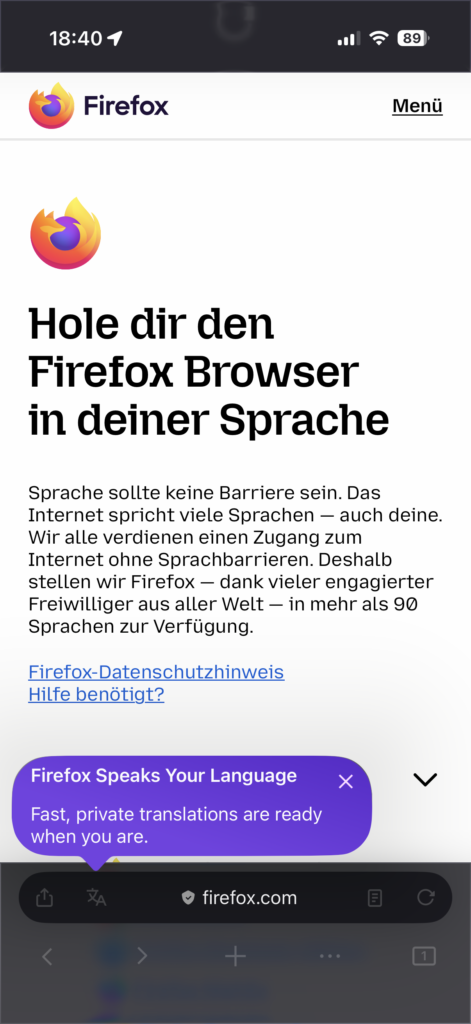
When Firefox detects that a page is in a different language from your device settings, it shows the translation icon in the toolbar and will translate to the language that is set on the device.
Customize your Firefox icon – now on Android too
When we released choose your icon on iOS earlier this year, it quickly became one of the most charming ways to personalize Firefox. People loved picking the version that matched their mood, whether bold, classic or a little bit whimsical.
Now that same experience comes to Android.
Personalize your home screen
On Android, head to: Settings → Customize → App Icon. From there, you can browse a lineup of Firefox styles, including Momo, the warm, joyful fox hugging the Earth. What makes Momo special isn’t just the art itself, but the story behind it.
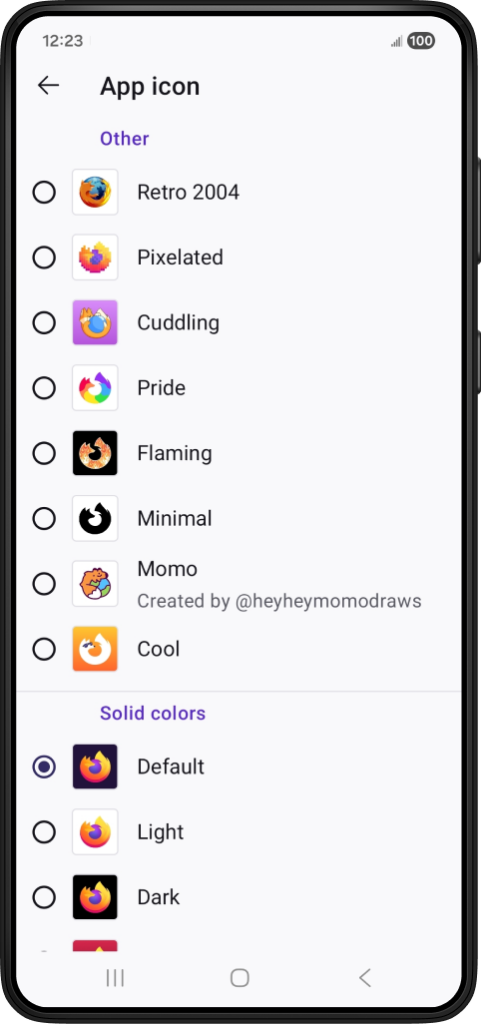
Momo was originally a five-minute doodle by Dutch illustrator Ruud Hendriks (@heyheymomodraws). Its playful energy immediately resonated with the Firefox team, who saw in it a spark of nostalgia that echoed Firefox’s early logo. Today, that doodle has become the first community-created Firefox app icon.
Ruud’s artwork reminds us that some of the most delightful product features start as small, genuine ideas from our community.
Read the full interview with Ruud to see how his sketch evolved into an icon now loved by Firefox users worldwide.

Discover how this fan-made icon made its way into Firefox
Read moreA new option for search, still on your terms
Search should feel flexible, something you can shape based on what you need. That’s why in our last release we introduced Perplexity, an AI-powered answer engine, as an optional search tool on mobile.
Perplexity provides conversational answers with citations, making it easier to get quick summaries without sifting through multiple pages. And, as always, you choose when or whether to use it.
You’ll find Perplexity in the search bar. It’s available globally and Perplexity maintains strict prohibitions against selling or sharing personal data.
It’s one more way Firefox gives you choice without compromising your values.
Created for everyday browsing
Whether you’re translating the web during your commute, giving your home screen a little personality or trying a new way to search, today’s updates reflect a simple goal: make Firefox feel more personal and more you.
And, just like Momo, many of these ideas were shaped by the Firefox community: the artists, contributors, testers and curious users who help us imagine what the browser can be.
We can’t wait to see how you use what’s new.

Take Firefox with you
Download Firefox MobileThis post is also available in: Deutsch (German) Français (French)