Socorro Dumps Wave Good-bye to the Relational Database

Let’s say we’ve got some twenty-five million chunks of data ranging in size from one K to several meg. Let’s also say that we only rarely ever need to access this data, but when we do, we need it fast. Would your first choice be to save this data in a relational database?

That’s the situation that we’ve got in Socorro right now. Each time we catch a crash coming in from the field, we process it and save a “cooked” version of the dump in the database. We also save some details about the crash in other tables so that we can generate some aggregate statistics.

It’s that cooked dump that’s causing some concern. The only time that we ever access that data is when someone requests that specific crash using the Socorro UI. Considering that these cooked crashes take up nearly three quarters of the storage needs of our database, there’s not a lot of value there for the effort. They inflate the hardware requirements for our database, make backups take too long and complicate any future database replication plans that we might consider.

We’re about to migrate our instance of Socorro to new shiny 64bit hardware. Moving these great drifts of cooked dumps would take hours and necessitate potentially more than a day of down time for production. We don’t want that.

It’s time for a great migration. All those dumps are going to leave the database. We’re spooling them out into a file system storage scheme. At the same time, we’re reformatting them into JSON. In the next version of Socorro, when a user requests their dump by UUID, it will be served by Apache directly from a file system as a compressed JSON file. The client will decompress it and through javascript magic give the same display that we’ve got now.

There’s some future benefits to moving this data into a file system format. Think about all of this data sitting there in a Hadoop friendly format waiting for a future data mining project. We’ve nothing specific planned, but we’ve got the first step done.

We’re hoping to get the data migration done within the week. New versions of the processing programs will have to be deployed as well as the changes to the Web application. Once that’s done, we can proceed to the deployment of our fancy new hardware.

Browser Support

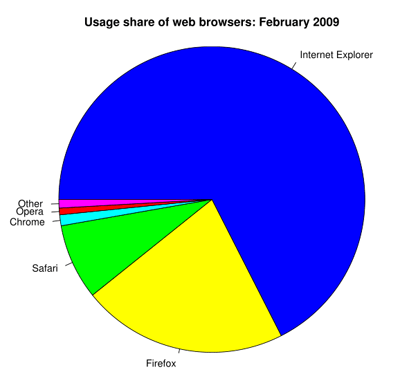
Browser marketshare February 2009

For the past couple of days I’ve been pondering our browser support chart that the Mozilla webdev team wrote up about a year ago. Since then, the browser ecosphere has changed considerably. Chrome burst onto the scene with no warning, IE8 was released and Safari 4 is up-and-coming.

One of the toughest parts of being a web developer is deciding what browser to support and how much to support each one. Should it be a binary decision, either support 100% or not? Support some browsers 100% and offer limited support for others? If you decide to gracefully degrade, how much and what features/functionality are considered essential?

And how do you decide which browsers to support? Do you choose via market share, cost/benefit, current/previous release, your website’s audience?

This is an especially tough decision when part of Mozilla’s mission is to promote openness, innovation and opportunity on the Internet. Not supporting a browser simply because a small percentage of users are using it and it’s difficult to code for goes against this mission. Websites and their content should be easily accessible for all platforms, browsers and devices.

It’s a constant battle when there is a distinct need to release early and release often, yet support as many browsers as possible. The added work of supporting more than the most recent browsers is not insignificant.

In the spirit of openness, I want to hear what the community has to say. What are your thoughts for browser support? What will promote Mozilla’s mission but also allow us to develop quickly?

CSS Spriting Tips

One of the most effective ways of speeding up a website’s render time is to reduce the number of HTTP requests required to fetch content. An effective method to achieve this is via CSS sprites, which is combining multiple images into one large image and using CSS to only display parts of it.

Here’s an example sprite:

Sprite Example

The purpose of this post is not to show how it makes a site faster, but cover some best practices when creating a CSS sprite.

Don’t wait until you are done slicing to begin spriting.

The problem with waiting until you’ve built the site is all your CSS and images have already been created. You will have to go back and re-write your CSS. You’ll also spend a ton of time in Photoshop attempting to fit 20-30 graphics into a sprite at once, which is extremely painful and tedious. It’s much easier to build the sprite step by step.

Arrange images opposite of how they will be displayed

This tip is a little confusing and I didn’t learn this until I was halfway through creating a large sprite. If an image is supposed to appear on the left of an element:

Sprite positioning example

Put that image to the right of the sprite (see sprite image from above). This way when you move the background image via CSS, there is no possible way any other image will display next to it. A common problem when creating CSS sprites is positioning images so they don’t appear as part of a background for the wrong element.

Avoid ‘bottom’ or ‘right’ in CSS when positioning

When positioning a CSS sprite behind an element, it’s very easy to use background-position: bottom -300px; or background-position: right -200px;. This will work initially, but the problem with it is once you expand your sprite in width or height, your positioning will be wrong as the images are no longer at the bottom or right of the sprite. Using explicit positioning in pixels avoids this issue.

Give each image plenty of space

As you can see from the example sprite, many tiny images are given lots of space. Why not just cram them all together to make the sprite smaller? Because the elements they are used on will most likely have variable content and need that extra padding so other images don’t show up.

Here’s an example:
Variable content example

Each list item has a graphical number as a background image. If you look at the sprite shown above, you can see how the images were staggered so that if the content increased, no other images would show up.

Don’t worry about sprite pixel size

Chances are if your site is decently designed, you will have a lot of images to put in your sprite. And you’ll need a pretty large sprite to space the images out appropriately. And that’s fine. Empty space in a sprite does not take up much of a file’s size. The sprite used for addons.mozilla.org is 1,000×2,000 pixels and is only 16.7kb!

Got other tips? Leave a comment!

More Resources

Crash Reporter Homepage Reskin

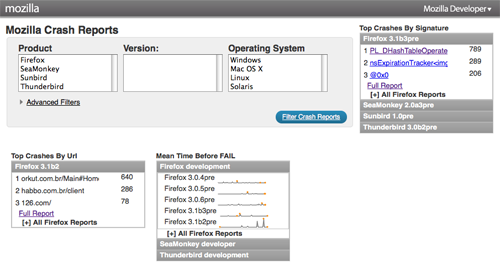
The crash reporter has been given a new look, and the homepage has a new Dashboard.

Screenshot of Crash Reporter homepage

Our UX Engineer Neil Lee has applied some simplifications to the query form. This redesign was focused on the homepage and global navigation.

Another new feature is that MTBF and Top Crashers By Signature can be exported in CSV format. In the future, as we want to slice and dice different reports, it should be trivial to add this feature to other reports.

In addition I’ve fixed a handful of issues:

  • 428110 – Quick and dirty changes to speed up crash analysis
  • 478043 – Make ‘is exactly’ the default choice
  • 479256 – Clarify labels to be Date Processed
  • 470524 – Crash signatures not indented
  • 479460 – Bad Unicode in User Comments
  • 479447 – report/list with no results has JS error

We would love your feedback. Check out some recently filed bugs or send us some feedback and file a new Socorro bug.

We’ve had some known issues around MTBF and Top Crashes by Signature in the last month and are working on fixing these issues. The upside is that SeaMonkey is now in MTBF.

CSS3 Awesome Test

Just for fun, I decided to whip up one big awesome demonstration of some new CSS3 features in Firefox 3.1.

This is a CSS3 awesome test. It demonstrates some of the awesome parts of CSS3 implemented in Firefox 3.1.

In case you aren’t using a Firefox 3.1 beta, here’s what you would see:
CSS3 example

CSS3 Used

* -moz prefix used.

Jos Buivenga’s Delicious font used for @font-face.

Text-shadow code borrowed from css3.info.

Cross-Browser Inline-Block

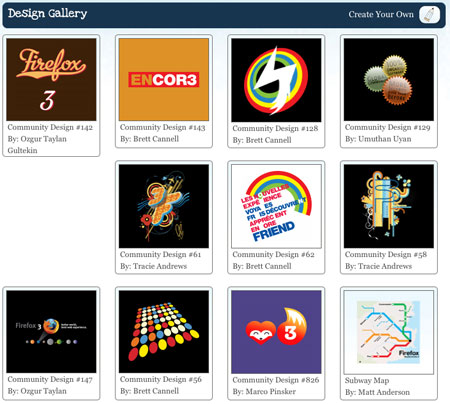
Ah, inline-block, that elusive and oh so tempting display declaration that promises so much, yet delivers so little. Too many times have I received PSD files like this:

Gallery Design

and begin to cry.

Normally, this type of layout would be a cakewalk. Fixed width, fixed height, float:left and you’re done. Buuuuut, the design needs to work with variable amounts of content, which means if one of these blocks has more content than the others, it will break the layout:
Broken Layout with float:left

Because the first gallery item is taller than the rest, the 5th item is floated left against it instead of below it. Basically we want a layout with the flexibility of a table, but proper, semantic markup.

We start with a simple page with an unordered list and display set to inline-block:

<ul>
    <li>
        <h4>This is awesome</h4>
        <img src="http://farm4.static.flickr.com/3623/3279671785_d1f2e665b6_s.jpg"
        alt="lobster" width="75" height="75"/>
    </li>
...
<ul>

<style>
    li {
        width: 200px;
        min-height: 250px;
        border: 1px solid #000;
        display: inline-block;
        margin: 5px;
    }
</style>

And it looks ok in Firefox 3, Safari 3 and Opera:
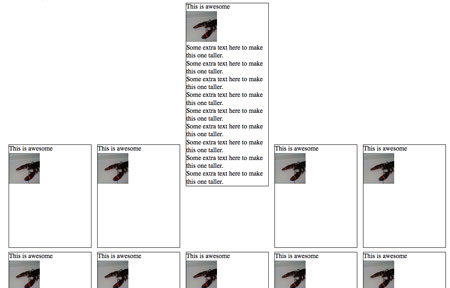
Step 1

Obviously, something is wrong with the vertical alignment. Well, not exactly wrong, because this is the correct behavior, but it’s not what we want.

What’s going on here is the baseline of each <li> is being aligned with the baseline of the parent <ul>. What’s a baseline, you ask? A picture is worth a thousand words:

Baseline

The baseline is the black line running through the text above. Putting it as simply as possible, the default vertical-align value on inline or inline-block element is baseline, which means the element’s baseline will be aligned with its parent’s baseline. Here’s the first inline-block attempt with baselines shown:
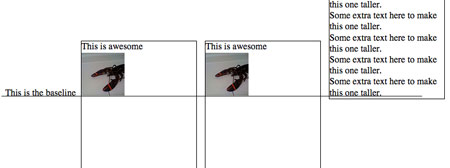
Baseline illustration

As you can see, each baseline is aligned with the baseline for the text ‘This is the baseline’. That text is not in a <li>, but simply a text node of the parent <ul>, to illustrate where the parent’s baseline is.

Anyway, the fix for this is simple: vertical-align:top, which results in a great looking grid:
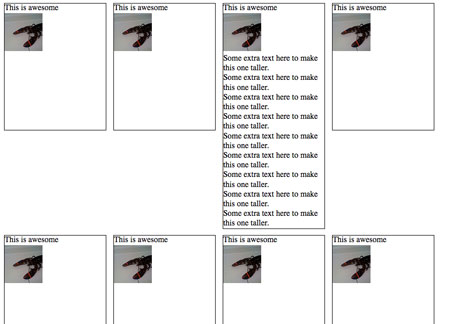
Inline block 2

Except it still doesn’t work in Firefox 2, IE 6 and 7.
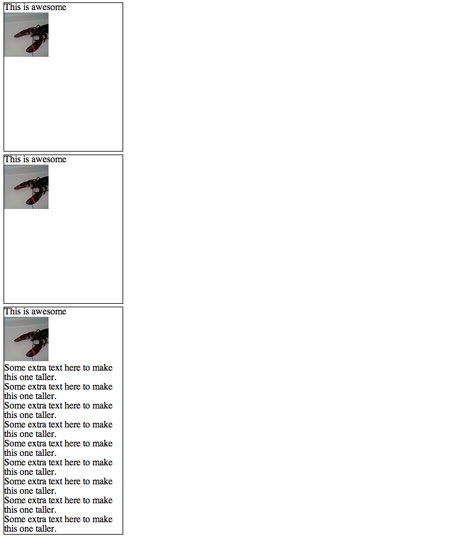
inline-block-ff2

Let’s start with Firefox 2.

Firefox 2 doesn’t support inline-block, but it does support a Mozilla specific display property ‘-moz-inline-stack’, which displays just like inline-block. And when we add it before display:inline-block, FF2 ignores that declaration and keeps -moz-inline-stack because it doesn’t support inline-block. Browsers that support inline-block will use it and ignore previous display property.

<style>
    li {
        width: 200px;
        min-height: 250px;
        border: 1px solid #000;
        display: -moz-inline-stack;
        display: inline-block;
        vertical-align: top;
        margin: 5px;
    }
</style>

Unfortunately, it has a small bug:

Inline Block in Firefox 2

Honestly, I don’t know what causes this bug. But there is quick fix. Wrap everything inside the <li> with a <div>.

<li>
        <div>
            <h4>This is awesome</h4>
            <img src="http://farm4.static.flickr.com/3623/3279671785_d1f2e665b6_s.jpg"
            alt="lobster" width="75" height="75"/>
        </div>
</li>

This seems to ‘reset’ everything inside the <li>’s and makes them display appropriately.

Inline block 2

Now, on to IE 7. IE 7 does not support inline-block, but we can trick it into rendering the <li>s as if they were inline-block. How? hasLayout, a magical property of IE that allows for all sorts of fun! You can’t set hasLayout explicity on an element with hasLayout:true; or anything easy like that, but you can trigger it with other declarations like zoom:1.

Technically, what hasLayout means is an element with hasLayout set to true is responsible for rendering itself and its children (combine that with a min-height and width, and you get something very similar to display:block). It’s kinda like magical fairy dust you can sprinkle on rendering issues and make them disappear.

When we add zoom:1 and *display:inline (star hack to target IE6 & 7) to the <li>s, we make IE 7 display them as if they were inline-block:

<style>
    li {
        width: 200px;
        min-height: 250px;
        border: 1px solid #000;
        display: -moz-inline-stack;
        display: inline-block;
        vertical-align: top;
        margin: 5px;
        zoom: 1;
        *display: inline;
    }
</style>
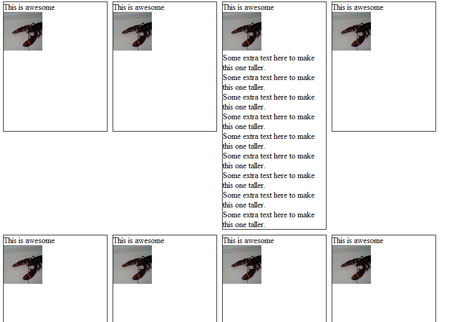
inline-block-ie7

Phew! Almost done. Just IE 6 left:

inline-block-ie6

IE 6 doesn’t support min-height, but thanks to its improper handling of the height property, we can use that instead. Setting _height (IE6 underscore hack) to 250px will give all <li>s a height of 250px, and if their content is bigger than that, they will expand to fit. All other browsers will ignore _height.

So after all that work, here’s the final CSS and HTML:

<style>
    li {
        width: 200px;
        min-height: 250px;
        border: 1px solid #000;
        display: -moz-inline-stack;
        display: inline-block;
        vertical-align: top;
        margin: 5px;
        zoom: 1;
        *display: inline;
        _height: 250px;
    }
</style>

<li>
        <div>
            <h4>This is awesome</h4>
            <img src="http://farm4.static.flickr.com/3623/3279671785_d1f2e665b6_s.jpg"
            alt="lobster" width="75" height="75"/>
        </div>
</li>

Native JSON in Firefox 3.1

In case you haven’t heard, one of Firefox 3.1’s awesome new features will be native JSON support. This is totally sweet for two reasons:

  1. eval’ing JSON in the browser is unsafe. Using native JSON parsing protects you against possible code execution.
  2. Safely eval’ing JSON with a 3rd party library can be orders of magnitude slower. Native JSON parsing is much faster.

How does native JSON work compared to plain old eval? Simple:

var jsonString = '{"name":"Ryan", "address":"Mountain View, CA"}';
var person = JSON.parse(jsonString);
// 'person' is now a JavaScript object with 2 properties; name and address

Pretty easy huh? And here’s how to get a JSON string from an object:

var personString = JSON.stringify(person);
// 'personString' now holds the string '{"name":"Ryan", "address":"Mountain View, CA"}'

“But wait!”, you say. “How is it safer? How much faster is it compared to eval?”. Ok, I’ll show you.

Native JSON parsing in Firefox 3.1 is safer because it does not support objects with functions. Attempting to convert an object with functions into a JSON string will only convert its properties and not its functions. And any malformed JSON string will result in a parse error instead of possible code execution.

Now, regarding speed, native JSON parsing is faster, much faster. Instead of pretty charts and graphs, I’ll give you a real-world example.

The new Graph Server uses a JSON API to fetch test information and results, so I figured it would be a good application to benchmark. So I wrapped our code that parses the JSON response with some Firebug profiler calls:

    console.time('parsejson');
    var obj = eval('(' + resp + ')');
    console.timeEnd('parsejson');

Loading a test’s results (array with 3,000 indexes, 24k gzipped) gave me a time of 125ms. (Repeated tests yielded results +/- 5ms). Then I changed eval to JSON.parse:

    console.time('parsejson');
    var obj = JSON.parse(resp);
    console.timeEnd('parsejson');

Which resulted in an average time of 40ms! That’s about 2.7 times faster with 1 line of code changed. Not bad!

Granted, a difference of 80ms isn’t that much, but in an AJAX (or, more accurately, AJAJ?) application, it can add up.

What’s the use of native JSON if it’s only available in Firefox? Luckily, IE8 has implemented it in RC1, which is rumored to be released in March. Hopefully other browsers will follow suit too, but for now it’s best to use a JSON parser such as the one on json.org. It’s small, safe and will not override native JSON implementation if detected.

Points to remember:

  • Plain old eval is unsafe (especially if you don’t trust the source), use a JSON library to protect yourself.
  • Use native JSON when available.
  • Bug other browser vendors to implement native JSON

Graph Server Re-Write

Over the past few months the Graph Server team and I have been hard at work re-writing the back end for the Graph Server and it’s finally come to fruition.

For those that don’t know, the Graph Server is used to display performance test data of Firefox builds reported by Talos.

Graph Server screenshot

Our work initially started as performance improvements and some new features, but the more we worked with the old architecture, it became quite apparent it would not scale (performance and feature-wise).

The old database schema duplicated test data in multiple tables and stored similar, but different data in the same tables. Tables had ballooned to millions (and billions) of rows that were queried for basic information such as all unique test names, resulting in queries that ran forever. And the queries that did finish were looped over in JavaScript to pull out test information, resulting in the browser locking up because it was looping over hundreds of thousands of rows.

If it’s not clear already, one of main issues was with the database schema; it needed to be normalized.

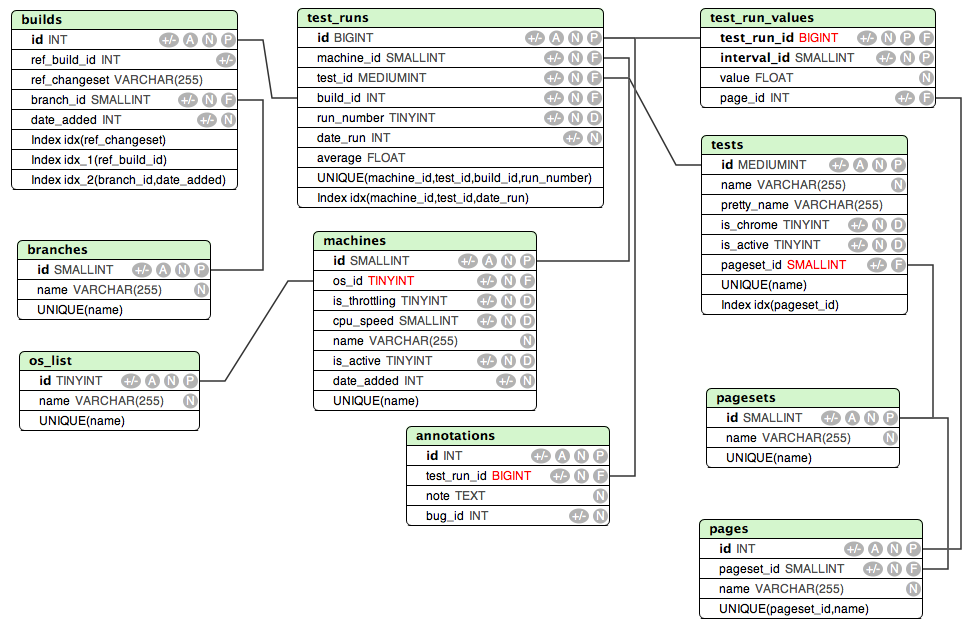
Here’s the old, non-normalized schema:

Old Graph Server schema

And here’s the new, normalized schema after the team was locked in a room for an afternoon:

New Graph Server schema

Much cleaner, no duplicated data, easy to understand the various machines, branches and tests that are used for displaying test data. No need look at entire tables to find basic information such as test names.

With this new schema in place, it also required a re-write of our server-side scripts we use to fetch test information for the front end graphing component. Since Mozilla is as open as possible, instead of just changing what was needed, I decided to implement a JSON API that would allow anyone to easily retrieve test data.

Lastly, our Talos <--> Graph Server communication needed to be re-written. Lars rewrote the collector script that accepts values from Talos and Alice rewrote the pieces of Talos that send data to the Graph Server.

After all that work, we now have a working stage server (Firefox 3.1 or higher required due to native JSON requirement) with our new code. We have a bit more testing and some performance benchmarking to do before it goes live, but we’re happy that all the pieces are working.

Want to know more? We have a wiki page with more information at https://wiki.mozilla.org/Perfomatic#Rearchitecture.

The Curious Case of the Giant Scrollbar

Recently I fixed bug 439269 (“AMO theme has unnecessary scrollbar at the bottom”) and thought it was an interesting bug for a few reasons.

To summarize the issue, for no apparent reason in right-to-left languages a really long scrollbar would appear at the bottom of the window.

Screenshot of scrollbar

Even though there was a scrollbar, when you scrolled all the way to the left, nothing was there. Another reason this was odd was the scrollbar only appeared in right-to-left (RTL) languages. Inspecting the page via Firebug didn’t give any clues as to what was causing the issue as there was no element hidden somewhere onscreen. Finally, to make things even weirder, the scrollbar only appeared when JavaScript was turned on.

After some thought, I had a feeling that we might be using absolute positioning to position an element to the left and above the page offscreen, which is quite common. In a RTL page, however, left is does not move an element outside a page’s boundaries. So the result is you get a scrollbar.

So what’s a web developer to do? Firebug to the rescue! I popped it open and started typing some JavaScript into the console to find an element that seemed really far offscreen:

var nodes = document.getElementsByTagName("*");

for(var i=0; i < nodes.length;i++) {
    var node = nodes[i];
    if(node.offsetLeft < -500) {
        console.log(node);
    }
}

And Firebug’s console spit out:

<ul id="cat-list">

Ah-ha! Now I was getting somewhere. A quick search through our CSS files for ‘#cat-list’ found an interesting line of code:

#categories.collapsed #cat-list {
    position: absolute;
    left: -999em;
    top: -999em;
}

And when JavaScript is turned on, the class ‘collapsed’ is added to the parent node #categories. In RTL mode this creates a huge scrollbar because -999em to the left of the page is a valid location that a user can scroll to. The solution?

.html-rtl #categories.collapsed #cat-list {
    position: absolute;
    left: 999em;
    top: -999em;
}

On any pages that are RTL, we add the class ‘html-rtl’ to the body tag in order to change the layout for RTL languages. This fixes the issue by moving the category list offscreen to the right, which is outside the page in RTL mode.

Things to remember:

  • Firebug is your friend
  • The DOM is a live document you can inspect, utilize this feature
  • Be careful with positioning with sites that are LTR and RTL

Socorro Partitioning Rolled Back

This Thursday and Friday we attempted to push updates to re-partition our crash report database and optimize the reporting tool to take advantage of it.  This was the deployment of bug 432450 and a fix for bug 444749, among others.

Our first attempt suffered from a network timeout, which required an eleven hour restore and re-run.  The re-run, done Friday, was done using a socket connection but would have required an additional 1-3 days of downtime, which was well outside our originally announced window.  Consequently, the database was rolled back to its contents as of 6:55PM PDT, January 29.  Reports have since resumed processing.

We plan on doing the following:

  • Set up a complete replica of production to test this process end-to-end.  Our dry runs were done on a staging database that was roughly 1/5 the size. We anticipated a scaling of O(n), but in practice on the production server, we got performance more inline with O(n^2). So we did not expect the full extent of timeouts or how much downtime would be needed.  This will be avoided in future updates and we are setting up a stage database from a recent dump (once we gather the hardware for it).
  • Push a now+ partitioning script.  The work done in bug 432450, on top of a complex migration script for old data, has logic for handling new partitions automatically which benefits new reports.  Since we don’t want to keep adding to our old database schema, we will push these updates so that new reports are properly partitioned.  Pros – in a week or two, things will be speedy and we aren’t going to struggle with timeouts.  Cons – we aren’t migrating the last 4 weeks. We will not see a performance increase when querying data older than the date of the repartitioning.

We would like to push the partitioning script (without migration of old data) on Thursday.  We will announce when it will be as soon as we know.

Long term, we are already in the process of seeking additional resources to help examine our database configuration and systems architecture.  We will have more updates on that process in the future.

Our team wants this work deployed as much as everyone else.  Thanks to everyone for their patience as we work through these issues.