Mozilla Labs Meetup – Wednesday 11/12

It’s time for another Monthly Meetup. This month’s Labs Night will be next Wednesday, November 12th, 6pm at Mozilla’s office – 1981 Landings Drive, bldg K in Mountain View, California.

We are super excited about this session. The teams from Seedcamp are spending the week in Silicon Valley and will be joining us on Wednesday evening. Several Mozilla folks will be giving lightning talks – Dion Almaer will be discussing the Ajax revolution and how it dovetails with UX; Jono DiCarlo will give an update on Mozilla Labs projects; and David Ascher and the Thunderbird team will discuss their latest UI experiments. We’ll also have time for discussion, hacking, and of course, pizza :).

If you are in the Bay Area we’d love to see you next week!  Please RSVP in the comments so we know how many to expect. Thanks!

Concept Series Design Jams at University of Michigan

In September a group of HCI students at the University of Michigan’s School of Information began a series of design jams focused on the future of the browser. These awesome events aim to contribute ideas to the Concept Series. When we launched the series we put out a call for “industry, higher education and people from around the world to get involved and share their ideas and expertise as we collectively explore and design future directions for the Web”. These students are doing just that.

Headed by Liz Blankenship, a current Masters student in the HCI program, the first satellite Labs night encouraged brainstorming around how to create a better browser. The students divided into four groups – Tabs, History, Automation, and Web Apps – and discussed use cases present in each. Check out a complete wrap up of the event on the Student Organization for Computer-Human Interaction website. The second event, held in October, took ideas generated at the first session and expanded them into mockups and sketches. The students again broke into teams and dove into fleshing out details around each concept. More details here. The third and final jam will tackle creating functional prototypes.

Great work by these students. We would love to hear about similar projects. What are your thoughts on the future of the browser?

Add them to the Concept Series in any state – crazy idea, sketch, mockup, prototype, all are welcome!

Mozilla Labs in Berlin: Hack Days

Announcing three great opportunities to hang out and hack with Mozilla Labs! As part of the Labs whistle-stop tour through Europe, we will be hosting Hack Days at c-base in Berlin. These sessions will be super informal and totally flexible – join for any part of the day to code, ask questions, or just hang out. Meet the leads for high-profile future-of-the-web experiments including Weave, Ubiquity, Geode, and Personas.

  • Lightening presentations every two hours on Labs projects. Open slots for anyone else who wants to do a lightening presentation on their own project.
  • Showcase presentations for projects people have been working on during the Hack day
  • Workshops for web best practices
  • Previews of new content features in Firefox 3.1 (SVG Transforms!)
  • Workshops and tutorials for making Ubiquity commands
  • Competitions around story boarding new concepts, creating Ubiquity commands, and Geode-enabled sites

Schedule:

Tuesday 10/21
3-7:00pm Mozilla Labs Hack Day 1 at c-base
Weave in the afternoon, Ubiquity in the late afternoon/evening

Wednesday 10/22
12:30pm-7pm Mozilla Labs Hack Day 2  at c-base
Ubiquity in the afternoon, Weave in the late afternoon/evening

Thursday 10/23

9:30am-12pm Mozilla Labs Hack Day 3 at c-base

We hope to see you there!

Developer Tools and the Open Web

Today we’re announcing the formation of a new group that will focus on the research and development of developer tools for the open Web.

We believe that there’s tremendous opportunity for innovation in tools that increase developer productivity, enable compelling user experiences, and promote the use of open standards.

We’re also excited to announce that Dion Almaer and Ben Galbraith, co-founders of Ajaxian, the Ajax Experience, and long-time supporters of the open Web, have joined Mozilla full-time to lead this newly formed Developer Tools Lab.

We’re just getting started, so please stay tuned for further details and information on getting involved.

Everything is on the table, from services to software, and we’re looking forward to working with Web developers from around the world to create, experiment and play with new ideas!

Introducing Geode


Always know where you are.

You’ve arrived in a new city, a new continent, a new coffee shop. You don’t really know where you are, and are looking for a good place to eat. You pull out your laptop, fire up Firefox, and go to your favorite review site. It automatically deduces your location, and serves up some delicious suggestions a couple blocks away and plots directions there.

In order for this to be a possibility, your browser needs to know where you are.

To do this, future versions of Firefox plan on supporting the new W3C Geolocation Specification, which adds the native ability for Web sites to request, and you to optionally grant access to, your location.  We’re still working out the specifics, but we’re hoping that location will be provided by one or more user selectable service providers and methods, e.g. GPS-based, WiFi-based, manual entry, etc. You’ll be able to play with this in the upcoming beta releases of Firefox 3.1, as well as alpha releases of Fennec.

We realized, though, that some of our Firefox 3 users might also want to get a head start playing with gelocation Today.

Introducing Geode, an experimental add-on to explore geolocation in Firefox 3 ahead of the implementation of geolocation in a future product release. Geode provides an early implementation of the W3C Geolocation specification so that developers can begin experimenting with enabling location-aware experiences using Firefox 3 today, and users can tell us what they think of the experience it provides. It includes a single experimental geolocation service provider so that any computer with WiFi can get accurate positioning data.

The potential here is for more than just resturant lookups. For example, imagine an RSS reader that knows the difference between home and work and automatically changes it’s behavior appropriately. Or a news site whose local section is, in fact, actually local. Or Web site authentication that only allows you to login from certain physical locations, like your house.

What else will location make possible? Even if you can’t code, you can share your thoughts by commenting on this post or via the Concept Series, a forum for surfacing, sharing, and collaborating on new ideas and concepts.

How It Works & Privacy Implications

With Geode when a web site requests your location a notification bar will ask how much information you want to give that site: your exact location, your neighborhood, your city, or nothing at all.

We’re using Skyhook’s Loki technology to map the Wifi signals in your area to your location. Unlike normal GPS-based methods which can take upwards of 45 seconds for a lock, Geode works both inside and outside with an accuracy of between 10 to 20 meters, normally within a second.

Please note that in this early implementation, both location and IP information is sent to the current provider, Skyhook, everytime a website is granted access to your location. Skyhook’s privacy policy is that they do not store or use any personal identifying information, and they promise to only keep data in anonymized agregate. The ultimate plan for Firefox is that service providers and geolocation methods will be pluggable and user selectable — to provide users with as many choices and privacy options as possible.

As an experiment, Geode is also the beginning of a conversation about location-based privacy and integrating services that share personal data into Web browsers.

Download & Try It Out

You can download Geode here.

To see Geode in action you can check out the demo Food Finder, which shows you the cafes and restaurants within walking distance.

To kick off Geode, two other websites have started innovating with location. Both require accounts before you can try them out.

Pownce is a service that makes it easy to send stuff (music, photos, events, and messages) to your friends. Adding the power of location — where you are when you uploaded a photo or sent a message — paints a compelling picture that helps you discover friends and activities around you. Head there to see it in action (you’ll have to sign up for an account).

Yahoo! Fire Eagle is a service that acts as a broker for your location, creating a single place where any web service, from any device can get access to your last updated location. Fire Eagle integrates with Geode so that you’ll never have to manually enter your location again. Once you have a Fire Eagle account, you can see Geode working here.

Differences between Geode and Geolocation in Firefox 3.1

Geode and the Geolocation Services in Firefox 3.1 will use the same W3C API for Geolocation, meaning that the same Javascript code will work in both. The still-in-developement Firefox 3.1 version will allow the user to choose a geolocation service provider, which can either be a peripheral device like a GPS, or a web-based service provider like we’ve used in Geode. We’ll be using the feedback we get from Geode, as well as the feedback we see on the upcoming Firefox 3.1 Beta and Fennec Alpha releases, to refine the feature before shipping it in a future Mozilla product release. We’re particularly interested in ensuring that the final implementation is as sensitive to user privacy and choice as possible.

Get Involved

We’ve implemented a portion of the tentative W3C Specification for Geolocation that we’ve been collaborating on. This means that if you add geolocation to your site for use with Geode, it’s future-proofed to work when Firefox (and other browsers) bundle geolocation.

Using Geode on your site as simple as:

navigator.geolocation.getCurrentPosition(function(pos) {
  alert( pos.latitude + ", " + pos.longitude );
})

For two more pedagogical examples, see here and here. For a run-down of exactly what’s implemented, see the Geode wiki page. You can also get involved with the Firefox 3.1 feature either by commenting on the W3C specification, or by participating in the mozilla.dev.apps.firefox mailing list.

Credits

Special thanks to Ryan Sarver at Skyhook Wireless, Leah Culver at Pownce, and Chris Martin at Yahoo! for participating in the development and launch of the Geode prototype.

Thanks to Doug Turner for developing Geolocation Services in Firefox 3.1. And Justin Dolske and Aza Raskin for developing Geode.

Mozilla Labs Meetup – Thursday, 9/25

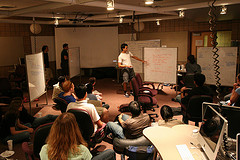
It’s time for another Monthly Meetup. This month’s meetup will be next Thursday, September 25th, 6pm at Mozilla’s office – 1981 Landings Drive, bldg K in Mountain View, California.

Last month’s meetup in San Francisco was awesome! Turnout was great and discussion around Ubiquity was really exciting. Thanks to all who participated and thanks to our friends at Twitter for hosting. This month we want to hear from you! What is your big idea for the future of the Web? Do you have thoughts to add to the Concept Series? We are anxious to hear what inspires you! If you plan to join us and share, please take a moment to RSVP on this blog and let us know what to expect.

If you are in the Bay Area we’d love to see you next week!  Please RSVP in the comments so we can order enough pizza. Thanks!

Introducing Ubiquity

An experiment into connecting the Web with language.

It Doesn’t Have to be This Way

You’re writing an email to invite a friend to meet at a local San Francisco restaurant that neither of you has been to.  You’d like to include a map. Today, this involves the disjointed tasks of message composition on a web-mail service, mapping the address on a map site, searching for reviews on the restaurant on a search engine, and finally copying all links into the message being composed.  This familiar sequence is an awful lot of clicking, typing, searching, copying, and pasting in order to do a very simple task.  And you haven’t even really sent a map or useful reviews—only links to them.

This kind of clunky, time-consuming interaction is common on the Web. Mashups help in some cases but they are static, require Web development skills, and are largely site-centric rather than user-centric.

It’s even worse on mobile devices, where limited capability and fidelity makes this onerous or nearly impossible.

Most people do not have an easy way to manage the vast resources of the Web to simplify their task at hand. For the most part they are left trundling between web sites, performing common tasks resulting in frustration and wasted time.

Enter Ubiquity

Today we’re announcing the launch of Ubiquity, a Mozilla Labs experiment into connecting the Web with language in an attempt to find new user interfaces that could make it possible for everyone to do common Web tasks more quickly and easily.

The overall goals of Ubiquity are to explore how best to:

  • Empower users to control the web browser with language-based instructions. (With search, users type what they want to find. With Ubiquity, they type what they want to do.)
  • Enable on-demand, user-generated mashups with existing open Web APIs. (In other words, allowing everyone–not just Web developers–to remix the Web so it fits their needs, no matter what page they are on, or what they are doing.)
  • Use Trust networks and social constructs to balance security with ease of extensibility.
  • Extend the browser functionality easily.

Learn more about Ubiquity and the capabilities that it could provide for users and developers.

The Initial Prototype

As part of this announcement, we’re also releasing an early experimental prototype to demonstrate some of the concepts of Ubiquity and the possibilities that it opens up. This release is meant as a illustration of a concept and mainly focuses on the platform. The next release will explore interfaces that are closer to features that might make it into Firefox.

Install the prototype and you’ll be presented with a tutorial to get you started.

Ubiquity 0.1

  • Lets you map and insert maps anywhere; translate on-page; search amazon, google, wikipedia, yahoo, youtube, etc.; digg and twitter; lookup and insert yelp review; get the weather; syntax highlight any code you find; and a lot more. Ubiquity “command list” to see them all.
  • Find and install new commands to extend your browser’s vocabulary through a simple subscription mechanism
  • Read about Ubiquity In Depth, or see a number of the commands in action (with screenshots) in the Ubiquity Tutorial.

All of the code underlying the Ubiquity experiment is being released as open source software under the the GPL/MPL/LGPL tri-license.

This is the goal of what kinds of language-based services Ubiquity hopes to inspire people to create:


This is a screenshot of Ubiquity’s current map functionality:


Influences, References, and Background Resources

For a full list, see the credits page.

Get Involved

Mozilla Labs is a virtual lab where people come together online to create, experiment and play with Web innovations for the public benefit. The Ubiquity experiment is still in its infancy and just getting started. There are many ways to join the team and get involved:

We’ve also started compiling a suggestion list for possible Ubiquity commands. If you have any suggestions, add them here or get inspired and develop one of them and add them to the command repository.

New Tab Concepts

The user experience for opening up a new tab in Firefox is somewhat lacking: you are greeted by an intimidating, blank canvas with no hint of what to do. Could Firefox be doing something better with it? The answer is almost certainly yes, but the question is what?

Initial Ideas & Mockups

To get the ball rolling, we are highlighting two early concepts.

The first is Aza Raskin’s Contextual New-Tab Actions, which is a look at using the power of context and contextual actions to enhance the browsing experience through a smarter new tab. Its main goals are to:

  • Simplify the common actions, like being on a page and needing to perform a look-up on some text. Right now you have to copy the text, open a new tab, go to a new web service, and paste it in. If the browser knows you’ve just selected an address and then opened a tab, it knows you’ll probably want to map it. Let’s give the user one-click access to mapping it.
  • Streamline your habits. If you always visit TechCrunch after reading Slashdot, the browser can offer you one-click navigation from a new tab.
  • Super-charge search. You often go to a new tab to start a search action: Make that front and center.

The ideas are meant to be mix-and-match, not necessarily all used together.

Experimental Add-On

Edward Lee, the main developer of the Awesome Bar in Firefox 3, has already starting experimenting with a zero-configuration new-tab extension. Try it out.

Ambient News

The second is Atul Varma’s Ambient News, an experiment into how Firefox could learn from your habits to give you the news you care about in the new tab area. Its goal are to:

  • Provide the user with zero-configuration news about the sites that they visit frequently.
  • Explore how to bring the benefits of RSS to a wider audience.

Get Involved

So what do you think about these ideas? They are not meant as static artifacts, but as a launchpad for thinking about better ways to use the new-tab workflow. There are two ways in which you can participate in the design process:

1) Provide feedback on each of the concepts shown here for Contextual New Tabs, here for Ambient News, and here for Edward Lee’s add-on.
2) Get involved and share your own ideas and expertise.

Monthly Labs Meetup – August 2008 – San Francisco

It’s time for another Monthly Meetup. This month’s meetup will be Thursday, August 28th, 6pm at the Twitter office – 539 Bryant St. Suite 402, San Francisco.

There will be progress updates on the various active Labs projects as well as plenty of opportunity for discussion and hacking. And of course, pizza 🙂

If you are in the Bay Area we’d love to see you!  Please take a moment to RSVP by commenting on this blog.

Announcing the Extend Firefox 3 Contest Winners

Extend Firefox 3 has wrapped up and we’re very excited to announce the winners! We received well over 100 entries, representing hundreds of hours of hard work from people around the world.

This contest had an extraordinary group of judges of which we would like to thank, including Dr. Jun Murai, Toby Padilla, Gina Trapani, Brendan Eich, Mike Connor, Mike Beltzner and our sponsors, including Last.fm, ActiveState, and VMWare.

Many of these extensions are in their early stages of experimental development, however we have seen some powerful new tools and prototypes that we are excited to share. It was hard to determine the winners, but at last, here they are.

Best New Add-on

Grand Prize Winners (3)

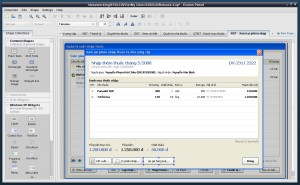
Pencil by Dương Thành An

GUI prototyping and diagramming that everyone can use.

The Pencil Project’s unique mission is to extend Firefox 3 to an opensource tool for making diagrams and GUI prototyping that everyone can use. Pencil makes uses of the SVG support in Firefox 3 to implement all the shape rendering and scripting.

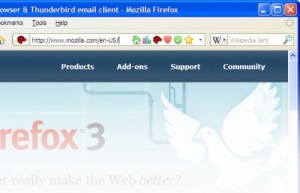
Tagmarks by Felipe Tassario Gomes

One click bookmark tagging

This add-ons adds a set of icons to the quick bookmarks, allowing you to quickly add tags to your bookmarks by clicking on each icon.

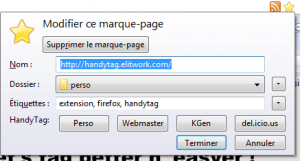
HandyTag by Rémi Szymkowiak

Automatic bookmark tagging

HandyTag simply providing a complete set of most relevant keywords in the bookmark’s edition panel. These keywords are retrieved from many different sources.

Runners up (6)

Best Updated Add-on

Grand Prize Winners (3)

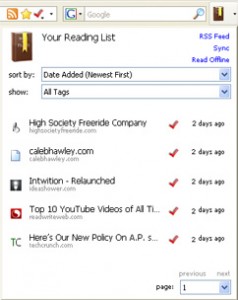
Read it Later by Nate Weiner

Save pages of interest for later reading

Read It Later allows you to save pages of interest to read later. It eliminates cluttering of bookmarks with sites that are merely of a one-time interest. Features include offline reading, sync between computers, and RSS feed creation.

TagSifter by Chiisai Tsu

Browse your bookmarks by their tags

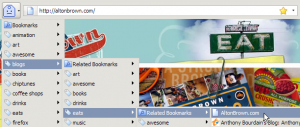
Firefox 3 lets you tag your bookmarks, but it doesn’t give you a great way to browse your bookmarks by their tags. TagSifter tries to. Select a group of tags in the sidebar or menu, and TagSifter shows you all the related tags and bookmarks.

Bookmark Previews by John Marshall

Adds an album view and thumbnail view to the bookmarks manager

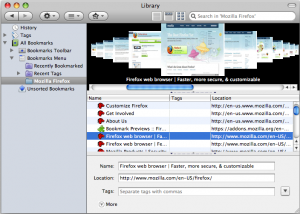
Along with an album view (like cover flow) and a thumbnail view (with drag and drop), this extension also adds previews to the tooltips in the bookmarks sidebar. Just hover over a bookmark in the sidebar to see the previews.

Best Music Add-on

Grand Prize Winner (1)

Fire.fm by Jorge Villalobos and Jose Enrique Bolaños

Direct access to the extensive music library on Last.fm

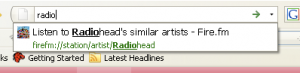
Listen to music related to your favorite artist, and discover new artists and music in the process. Listen to your friends’ favorite music. Find Last.fm users with musical taste similar to your own. Quickly access your favorite stations by just typing a few letters into the location bar.

We truly appreciate the efforts of all the participants and their support of the Mozilla Community! Thanks again for such a great contest!